class Scalar:
pass
Compute Graph, Autograd and Backprop
Fall 2026
CSC-372 Project Part 5

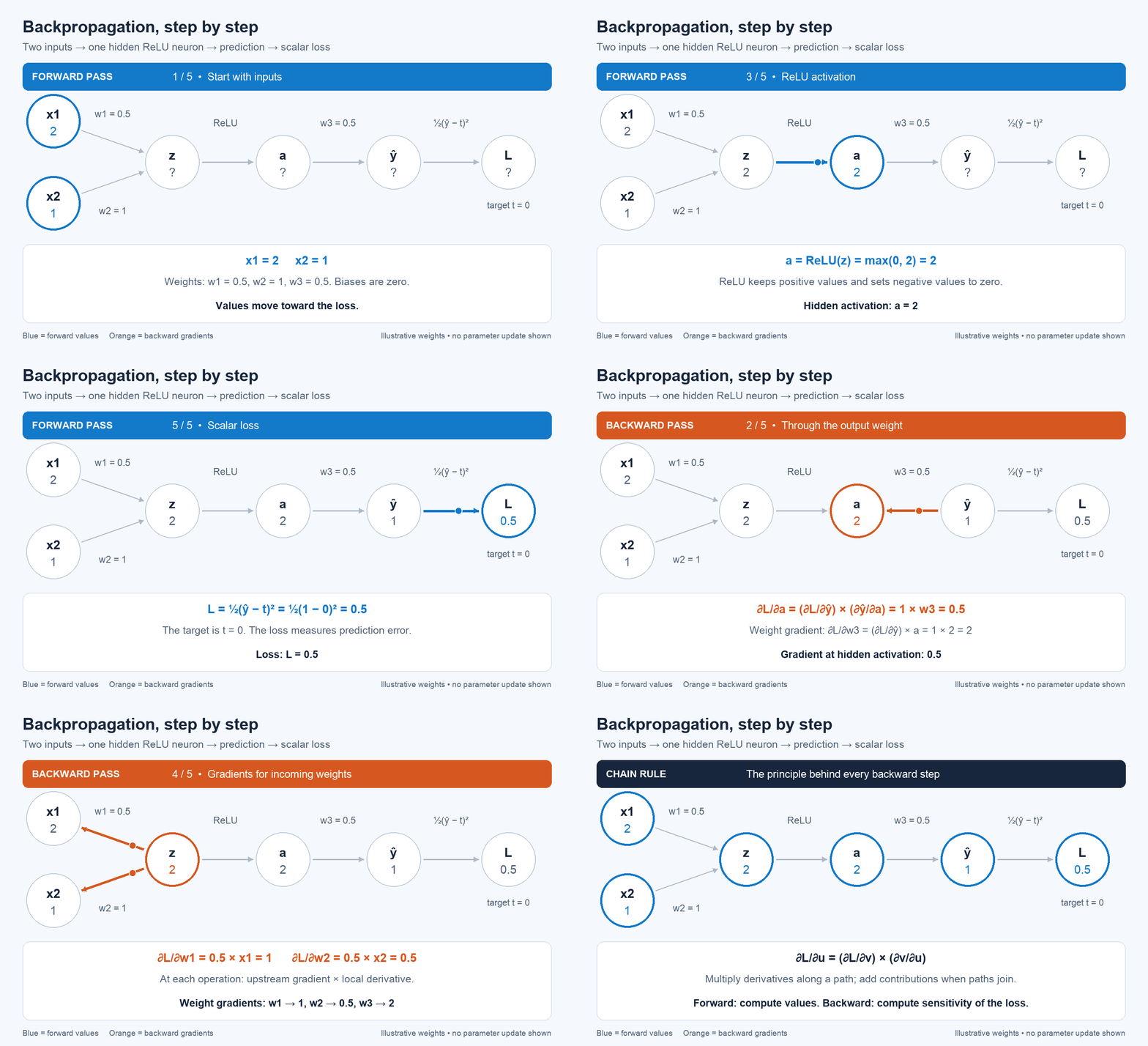
Modern deep learning frameworks such as PyTorch make it remarkably easy to define a neural network, compute a loss, call loss.backward(), and update the model’s parameters.
But what exactly happens when we call backward()?
In this assignment, you will find out by building a small automatic differentiation (autograd) engine from scratch. By the end of the assignment, you will have implemented the essential machinery that allows neural networks to learn.
Your implementation will begin with a simple Scalar object representing a single scalar number. Unlike an ordinary Python number, however, a Scalar will remember how it was computed. As you perform arithmetic operations, your program will construct a computational graph connecting values and operations.
You will then implement the derivatives associated with these operations and use the chain rule to propagate gradients backward through the graph. This will allow you to implement your own version of:
loss.backward()
Once your autograd engine is working, in Project Part 6 we will use it to build the basic components of a neural network—including neurons, layers, and a multilayer perceptron (MLP). Then, we will train your network using gradient descent.
The goal is not to build a fast or production-ready deep learning framework. Instead, the goal is to understand the relatively small set of ideas underneath frameworks such as PyTorch.
Q1. Building the Scalar Class
We will begin by creating the fundamental building block of our autograd engine: the Scalar class.
The Scalar class will be the principal data structure used throughout this assignment. You can think of it as playing a role similar to:
- a
Tensorin PyTorch, or - a
DataFramein pandas.
Just as most operations in PyTorch operate on and return Tensor objects, the operations in our autograd engine will operate on and return Scalar objects.
There is one important simplification: while a PyTorch Tensor can contain scalars, vectors, matrices, or higher-dimensional arrays, our Scalar object will contain only a single scalar number.
However, a Scalar will store more than just that number. It will also keep track of information that allows us to reconstruct how the value was computed. This will eventually allow us to traverse the computation backward and calculate gradients.
1.1. Define the Scalar Class
Create a class called Scalar. Each Scalar object should store the following information:
data— the scalar numerical value represented by this object.grad— the derivative of the final output with respect to this value. Initialize this to0.0._prev— theScalarobjects that were used to produce this value. Store these as aset._op— a string describing the operation that produced this value, such as"+"or"*".label— an optional human-readable name that will make computational graphs easier to inspect.
Your constructor should support creating objects such as:
a = Scalar(2.0, label="a")
b = Scalar(-3.0, label="b")
At this point, a and b are leaf nodes. They contain values, but they were not produced by performing an operation on other Scalar objects.
# Test code
a = Scalar(2.0, label="a")
assert a.data == 2.0
assert a.grad == 0.0
assert a.label == "a"
assert a._prev == set()
assert a._op == ""
b = Scalar(-3.5)
assert b.data == -3.5
assert b.grad == 0.0
assert b._prev == set()
assert b._op == ""
print("1.1 complete!")Step 1 complete!1.2. Supporting Addition
Next, we want our Scalar objects to behave like numbers. In particular, we would like to write:
c = a + bTo make the + operator work with Scalar objects, implement the __add__ method.
The result of a + b should be a new Scalar object whose data contains:
a.data + b.dataBut storing the numerical result is only half of the job.
The new Scalar must also remember how it was created. This is where the _prev and _op attributes become important.
For the operation:
c = a + bc should record:
c.data → the result of a.data + b.data
c._prev → {a, b}
c._op → "+"The _prev attribute tells us which Scalar objects were the inputs to this computation, while _op tells us which operation was applied to those inputs.
Together, these attributes allow us to reconstruct the computational graph:
a ──┐
+ ──> c
b ──┘Notice that we do not need to explicitly create a separate graph object. The graph is constructed automatically as Scalar objects perform operations on one another.
For example, if we subsequently write:
d = c + athen d should remember that it was created from c and a, while c already remembers that it was created from a and b.
We therefore have enough information stored inside the Scalar objects themselves to reconstruct the entire chain of computation.
# Copy your previous implementation into this cell, then extend it with 1.2.
# Preserve the earlier version.
class Scalar:
passa = Scalar(2.0, label="a")
b = Scalar(3.0, label="b")
c = a + b
assert isinstance(c, Scalar)
assert c.data == 5.0
assert c._op == "+"
assert c._prev == {a, b}
assert a.data == 2.0
assert b.data == 3.0
assert a._prev == set()
assert b._prev == set()
a = Scalar(1.0)
b = Scalar(2.0)
c = Scalar(4.0)
d = a + b
e = d + c
assert d.data == 3.0
assert d._prev == {a, b}
assert e.data == 7.0
assert e._prev == {d, c}
print("Step 2 passed!")1.3. Supporting Multiplication
Implement the same behavior for multiplication by defining __mul__.
For example:
d = a * bshould create a new Scalar whose numerical value is:
a.data * b.dataand which records:
d._prev → {a, b}
d._op   → "*"
Again, performing the operation should both compute a value and add a new node to the computational graph.
# Copy your previous implementation into this cell, then extend it with 1.3.
# Preserve the earlier version.

class Scalar:
  pass
# Test code
a = Scalar(2.0, label="a")
b = Scalar(-3.0, label="b")
c = a * b
assert isinstance(c, Scalar)
assert c.data == -6.0
assert c._op == "*"
assert c._prev == {a, b}
a = Scalar(2.0, label="a")
b = Scalar(-3.0, label="b")
c = Scalar(10.0, label="c")
e = a * b
d = e + c
assert e.data == -6.0
assert e._op == "*"
assert e._prev == {a, b}
assert d.data == 4.0
assert d._op == "+"
assert d._prev == {e, c}
print("Step 3 passed!")1.4. Inspecting Scalars
Implement __repr__ so that printing a Scalar gives useful information.
For example:
a = Scalar(2.0)
print(a)
might produce:
Scalar(data=2.0)The exact formatting is up to you, but it should make debugging your autograd engine easier.
# Copy your previous implementation into this cell, then extend it with 1.4.
# Preserve the earlier version.

class Scalar:
  pass
# Test
a = Scalar(data=2.0)
representation = repr(a)
assert isinstance(representation, str)
assert "2.0" in representation
print("Step 4 passed!")1.5. Test Your Implementation
Once you have implemented the class, the following code should work:
a = Scalar(2.0, label="a")
b = Scalar(-3.0, label="b")
c = Scalar(10.0, label="c")

e = a * b
d = e + c
Inspect the values of:
e.data
e._prev
e._op

d.data
d._prev
d._op
From this information, you should be able to reconstruct the computation:
a ──┐
    * ──> e ──┐
b ──┘         + ──> d
          c ──┘
At this stage, do not implement backpropagation or calculate any derivatives. Your goal is simply to make every computation produce a Scalar that stores its numerical result and remembers how that result was produced.
a = Scalar(2.0, label="a")
b = Scalar(-3.0, label="b")
c = Scalar(10.0, label="c")
f = Scalar(-2.0, label="f")

e = a * b
d = e + c
L = d * f

assert e.data == -6.0
assert d.data == 4.0
assert L.data == -8.0

assert e._prev == {a, b}
assert d._prev == {e, c}
assert L._prev == {d, f}

assert e._op == "*"
assert d._op == "+"
assert L._op == "*"

print("All Scalar class tests passed!")Q2. Local Gradients and Chain Rule
In 1, our Scalar objects learned how to remember the computation that produced them. We can now build a computational graph such as:
a ──┐
    * ──> e ──┐
b ──┘         + ──> d
          c ──┘
However, our Scalar class does not yet know how to compute gradients.
Our next goal is to teach each operation how to propagate a gradient backward to its inputs.
2.1. Backpropagating Through Addition
Every Scalar should have a _backward function.
When a Scalar is first created, _backward should be a function that does nothing.
For example, a leaf node such as:
a = Scalar(2.0)was not produced by an operation, so there is nothing before a to propagate a gradient to.
Add a _backward function to your Scalar class that initially does nothing.
Consider:
a = Scalar(2.0)
b = Scalar(3.0)

c = a + b
Mathematically,
\[c = a + b\]
so the local derivatives are:
\[\frac{\partial c}{\partial a}=1\]
and
\[\frac{\partial c}{\partial b}=1\]
Suppose that during backpropagation we already know c.grad, which represents:
\[\frac{\partial L}{\partial c}\]
where \(L\) is the final output or loss.
Using the chain rule:
\[ \frac{\partial L}{\partial a} = \frac{\partial L}{\partial c} \frac{\partial c}{\partial a} \]
and similarly for \(b\).
Modify __add__ so that the Scalar it creates has a _backward function capable of propagating out.grad to the inputs of the addition.
Remember that gradients should be accumulated, rather than overwritten.
# Copy your previous implementation into this cell, then extend it with 2.1.
# Preserve the earlier version.

class Scalar:
  pass
a = Scalar(2.0)
assert callable(a._backward)
# Calling it should not produce an error.
a._backward()
print("Step 1 passed!")a = Scalar(2.0)
b = Scalar(3.0)
c = a + b
c.grad = 4.0 # manually / artificially setting gradient
c._backward()
assert a.grad == 4.0
assert b.grad == 4.0
print("Addition backward test passed!")Why 4.0?
Because:
\[ \frac{\partial L}{\partial a} = \underbrace{\frac{\partial L}{\partial c}}_{4} \underbrace{\frac{\partial c}{\partial a}}_{1} =4 \]
2.2. Backpropagating Through Multiplication
Now consider:
a = Scalar(2.0)
b = Scalar(3.0)

c = a * b
Mathematically,
\[c=ab\]
The local derivatives are:
\[\frac{\partial c}{\partial a}=b\]
and
\[\frac{\partial c}{\partial b}=a\]
Modify __mul__ so that its output has a _backward function that propagates the output gradient to both inputs.
Again, use the chain rule and remember to accumulate gradients.
# Copy your previous implementation into this cell, then extend it with 2.2.
# Preserve the earlier version.

class Scalar:
  pass
a = Scalar(2.0)
b = Scalar(3.0)
c = a * b
c.grad = 4.0
c._backward()
assert a.grad == 12.0
assert b.grad == 8.0
print("Multiplication backward test passed!")The expected gradients are:
\[\frac{\partial L}{\partial a}=4(3)=12\]
and
\[\frac{\partial L}{\partial b}=4(2)=8\]
2.3. Why Gradients Must Accumulate
A value may influence the final output through more than one path.
Consider:
a = Scalar(3.0)

b = a + a
Because \(b=2a\),
\[\frac{\partial b}{\partial a}=2\]
Your implementation should therefore accumulate both contributions to a.grad.
# Copy your previous implementation into this cell, then extend it with 2.3.
# Preserve the earlier version.

class Scalar:
  pass
a = Scalar(3.0)
b = a + a
b.grad = 1.0
b._backward()
assert a.grad == 2.0
print("Gradient accumulation test passed!")If this test fails, check whether your _backward functions are adding to gradients or replacing them.
At this point, individual operations know how to propagate gradients backward.
a = Scalar(2.0)
b = Scalar(3.0)

c = a * b
d = c + a

# d = ab + a

d.grad = 1.0

# Manually walk backward through the graph
d._backward()
c._backward()

assert d.grad == 1.0
assert c.grad == 1.0
assert a.grad == 4.0
assert b.grad == 2.0

print("Part 2 passed!")
Here,
\[d = ab + a\]
so:
\[ \frac{\partial d}{\partial a} = b+1 = 4 \]
and
\[ \frac{\partial d}{\partial b} = a = 2 \]
Notice something important: we still had to decide ourselves that d._backward() should be called before c._backward().
Our individual operations know how to differentiate themselves, but our autograd engine does not yet know how to automatically traverse an entire computational graph.
That is the problem we will solve next.
Q3. Implementing backward()
In Part 2, each operation learned how to propagate gradients to its immediate inputs.
However, we still had to manually call:
d._backward()
c._backward()
For a neural network containing thousands or millions of operations, manually determining the correct order would obviously be impossible.
Our goal is now to implement:
d.backward()and have our autograd engine automatically propagate gradients through the entire computational graph.
Why Does Order Matter?
Consider:
a ──┐
    * ──> c ──┐
b ──┘         + ──> d
          a ──┘
Before we can propagate the gradient from c to a and b, we first need to know the gradient of c.
Therefore, backpropagation must process nodes in an order such that a node receives all of its gradient contributions before its _backward() function is called.
We need a way to order the nodes in our computational graph.
3.1. Topological Ordering
A topological ordering of a computational graph places every node after the nodes that it depends on.
For example, for:
a = Scalar(2.0)
b = Scalar(3.0)

c = a * b
d = c + a
one valid topological ordering is:
a, b, c, dbecause c depends on a and b, and d depends on c and a.
Implement a method called _topological(self) that returns a list of all Scalar objects reachable from self, including self.
Starting from self, recursively visit each node’s _prev inputs. Add a node to the list only after visiting all of its inputs, so every input appears before the computation that depends on it.
Use a visited set to ensure each node appears exactly once, even when it is reachable through multiple paths. Independent inputs may appear in either order.
# Copy your previous implementation into this cell, then extend it with 3.1.
# Preserve the earlier version.

class Scalar:
  pass
a = Scalar(2.0, label="a")
b = Scalar(3.0, label="b")
c = a * b
c.label = "c"
d = c + a
d.label = "d"
topo = d._topological()
# your topological ordering should contain exactly four nodes:
assert len(topo) == 4
assert set(topo) == {a, b, c, d}
assert topo.index(a) < topo.index(c)
assert topo.index(b) < topo.index(c)
assert topo.index(c) < topo.index(d)
print("Topological ordering test passed!")3.2. Traverse the Graph Backward
The topological ordering gives us the order of the forward dependencies:
inputs → intermediate values → outputBackpropagation needs to travel in the opposite direction:
output → intermediate values → inputsTherefore, once you have constructed your topological ordering, traverse it in reverse order and call each node’s _backward() function.
Before beginning this traversal, set the gradient of the final output to:
self.grad = 1.0Why?
If the final output is \(L\), then:
\[\frac{\partial L}{\partial L}=1\]
This provides the starting point for backpropagation.
Put all of this logic inside a new method:
Scalar.backward()
You should now be able to write:
a = Scalar(2.0)
b = Scalar(3.0)

c = a * b
d = c + a

d.backward()
without manually calling _backward() on any intermediate values.
Recall that:
\[d=ab+a\]
Therefore:
\[\frac{\partial d}{\partial a}=b+1\]
and
\[\frac{\partial d}{\partial b}=a\]
# Copy your previous implementation into this cell, then extend it with 3.2.
# Preserve the earlier version.

class Scalar:
  pass
a = Scalar(2.0)
b = Scalar(3.0)
c = a * b
d = c + a
d.backward()
assert d.grad == 1.0
assert c.grad == 1.0
assert a.grad == 4.0
assert b.grad == 2.0
print("Basic backward() test passed!")Let’s make the computational graph slightly larger:
a = Scalar(2.0)
b = Scalar(-3.0)
c = Scalar(10.0)
f = Scalar(-2.0)

e = a * b
d = e + c
L = d * f

L.backward()
The forward computation is:
a ──┐
    * ──> e ──┐
b ──┘         + ──> d ──┐
          c ──┘         * ──> L
                    f ──┘
Here:
\[e=ab\]
\[d=e+c\]
and
\[L=df\]
a = Scalar(2.0)
b = Scalar(-3.0)
c = Scalar(10.0)
f = Scalar(-2.0)

e = a * b
d = e + c
L = d * f

L.backward()

assert L.data == -8.0

assert L.grad == 1.0
assert d.grad == -2.0
assert f.grad == 4.0
assert e.grad == -2.0
assert c.grad == -2.0
assert a.grad == 6.0
assert b.grad == -4.0

print("Deep computational graph test passed!")
Test whether your implementation correctly handles a value that contributes to the output through multiple paths:
Before running the test, calculate the derivative by hand.
The computation is:
\[d=(a^2+a)a\]
which can also be written as:
\[d=a^3+a^2\]
Therefore:
\[\frac{\partial d}{\partial a}=3a^2+2a\]
At \(a=3\):
\[ \frac{\partial d}{\partial a} = 3(3^2)+2(3) = 33 \]
a = Scalar(3.0)

b = a * a
c = b + a
d = c * a

d.backward()

assert d.data == 36.0
assert a.grad == 33.0

print("Gradient accumulation through multiple paths passed!")
Gradient accumulation through multiple paths passed!If this test passes, your autograd engine can now:
- construct a computational graph during the forward pass,
- store local derivative rules for individual operations,
- determine the dependencies between computations,
- traverse those computations in the correct order, and
- automatically calculate gradients using reverse-mode automatic differentiation.
In other words, you have implemented your own small version of:
loss.backward()in PyTorch.
Q4. Completing the Scalar API
Our autograd engine currently supports addition and multiplication. In principle, we could express many computations using only these operations, but building neural networks would quickly become cumbersome.
Before moving on, let’s make our Scalar objects behave more like ordinary Python numbers and PyTorch tensors.
We will add support for:
- exponentiation
- negation
- subtraction
- division
- operations with ordinary Python numbers
- a nonlinear activation function
For every new operation, remember the two responsibilities of our autograd engine:
- Forward pass: calculate the numerical result and record how it was produced.
- Backward pass: define how the gradient should propagate to the operation’s inputs.
4.1. Exponentiation
Implement __pow__ so that a Scalar can be raised to a numerical power.
For example:
a = Scalar(3.0)

b = a ** 2
should calculate:
\[b=a^2\]
The local derivative is:
\[ \frac{\partial b}{\partial a} = 2a \]
More generally, if:
\[b=a^n\]
then:
\[ \frac{\partial b}{\partial a} = na^{n-1} \]
Your implementation only needs to support powers that are ordinary Python int or float values.
# Copy your previous implementation into this cell, then extend it with 4.1.
# Preserve the earlier version.

class Scalar:
  pass
a = Scalar(3.0)
b = a ** 2
b.backward()
assert b.data == 9.0
assert a.grad == 6.0
# Try another power:
a = Scalar(2.0)
b = a ** 3
b.backward()
assert b.data == 8.0
assert a.grad == 12.0
print("Exponentiation test passed!")4.2. Negation
Next, implement unary negation:
b = -aMathematically:
\[b=-a\]
You do not necessarily need to create an entirely new primitive operation for negation.
Ask yourself:
Can \(-a\) be expressed using an operation our
Scalarclass already supports?
Implement __neg__ using your existing operations.
At this stage, multiplication supports two Scalar objects. To represent the constant (-1), create Scalar(-1.0) and use it with your existing multiplication operation.
In Section 4.5, you will add support for mixing Scalar objects with ordinary Python numbers.
# Copy your previous implementation into this cell, then extend it with 4.2.
# Preserve the earlier version.

class Scalar:
  pass
a = Scalar(3.0)
b = -a
assert isinstance(b, Scalar)
assert b.data == -3.0
b.backward()
assert a.grad == -1.0
print("Negation test passed!")4.3. Subtraction
Once negation works, implement subtraction:
c = a - bAgain, you do not need to implement subtraction as an entirely new primitive operation.
Think about how:
\[a-b\]
can be rewritten using addition and negation.
# Copy your previous implementation into this cell, then extend it with 4.3.
# Preserve the earlier version.

class Scalar:
  pass
a = Scalar(5.0)
b = Scalar(2.0)
c = a - b
assert c.data == 3.0
c.backward()
assert a.grad == 1.0
assert b.grad == -1.0
print("Subtraction test passed!")4.4. Division
Next, implement:
c = a / bRather than treating division as a completely new operation, recall that:
\[ \frac{a}{b} = ab^{-1} \]
Use the operations you have already implemented to define division.
# Copy your previous implementation into this cell, then extend it with 4.4.
# Preserve the earlier version.

class Scalar:
  pass
a = Scalar(6.0)
b = Scalar(2.0)
c = a / b
assert c.data == 3.0
c.backward()
assert abs(a.grad - 0.5) < 1e-10
assert abs(b.grad - (-1.5)) < 1e-10
print("Division test passed!")4.5. Working with Python Numbers
So far, expressions involving two Scalar objects should work:
a + b
a * b
However, we also want natural expressions such as:
a + 2
2 + a

a * 3
3 * a

a - 1
2 - a

a / 2
These are particularly important when implementing neural networks because constants appear frequently in mathematical expressions.
Modify your arithmetic methods so that ordinary Python numbers are automatically converted into Scalar objects when necessary.
You may also need to implement Python’s corresponding reverse operators, such as:
__radd__
__rmul__
__rsub__
__rtruediv__
# Copy your previous implementation into this cell, then extend it with 4.5.
# Preserve the earlier version.
class Scalar:
passa = Scalar(4.0)
assert (a + 2).data == 6.0
assert (2 + a).data == 6.0
assert (a * 3).data == 12.0
assert (3 * a).data == 12.0
assert (a - 1).data == 3.0
assert (10 - a).data == 6.0
assert (a / 2).data == 2.0
assert (8 / a).data == 2.0
print("Python number interoperability tests passed!")4.6. Add a Nonlinear Activation Function
A neural network consisting entirely of linear operations is still just a linear model, regardless of how many layers we stack together.
To build more expressive neural networks, we need nonlinear activation functions.
Implement the hyperbolic tangent activation function:
a.tanh()The forward computation is:
\[ t = \tanh(a) \]
You may calculate the forward value using Python’s math.tanh.
The derivative of \(\tanh\) is:
\[ \frac{dt}{da} = 1-t^2 \]
Notice that once you have computed the output \(t\), the local derivative can be calculated directly from that output.
# Copy your previous implementation into this cell, then extend it with 4.6.
# Preserve the earlier version.

class Scalar:
  pass
a = Scalar(0.5)
t = a.tanh()
assert abs(t.data - 0.4621171573) < 1e-6
t.backward()
expected_grad = 1 - t.data**2
assert abs(a.grad - expected_grad) < 1e-6
print("tanh test passed!")
# Also verify an especially simple case:
a = Scalar(0.0)
t = a.tanh()
t.backward()
assert t.data == 0.0
assert a.grad == 1.0
print("tanh zero test passed!")Final Checkpoint
Your Scalar class should now support relatively natural mathematical expressions.
Verify the forward calculation:
\[ c = \left(\frac{ab+2}{4}\right)^2 \]
For \(a=2\) and \(b=3\):
\[ c = \left(\frac{8}{4}\right)^2 = 4 \]
a = Scalar(2.0)
b = Scalar(3.0)

c = ((a * b + 2) / 4) ** 2

c.backward()
Verify the forward calculation:
\[ c = \left(\frac{ab+2}{4}\right)^2 \]
For \(a=2\) and \(b=3\):
\[ c = \left(\frac{8}{4}\right)^2 = 4 \]
assert c.data == 4.0

assert abs(a.grad - 3.0) < 1e-10
assert abs(b.grad - 2.0) < 1e-10

print("All Scalar API tests passed!")
Your Scalar class now behaves much more like the numerical objects provided by a deep learning framework.
You are ready to use it to build neural networks.
Trace Graph
Uses graphviz to render the computation graph of any Scalar:
draw_dot() traces _prev links and draws each node as a box showing data and grad, with operator nodes in between.
Great for seeing the forward/backward graph on a tiny expression or a single 2-input neuron.
In case graphviz is not installed, you can install it using:
!pip install graphvizfrom graphviz import Digraph
def trace(root):
nodes, edges = set(), set()
def build(v):
if v not in nodes:
nodes.add(v)
for child in v._prev:
edges.add((child, v))
build(child)
build(root)
return nodes, edges
def draw_dot(root, format='svg', rankdir='LR'):
"""
format: png | svg | ...
rankdir: TB (top to bottom graph) | LR (left to right)
"""
assert rankdir in ['LR', 'TB']
nodes, edges = trace(root)
dot = Digraph(format=format, graph_attr={'rankdir': rankdir}) #, node_attr={'rankdir': 'TB'})
for n in nodes:
dot.node(name=str(id(n)), label = "{ data %.4f | grad %.4f }" % (n.data, n.grad), shape='record')
if n._op:
dot.node(name=str(id(n)) + n._op, label=n._op)
dot.edge(str(id(n)) + n._op, str(id(n)))
for n1, n2 in edges:
dot.edge(str(id(n1)), str(id(n2)) + n2._op)
return dot# a very simple example
x = Scalar(1.0)
y = (x * 2 + 1).tanh()
y.backward()
draw_dot(y)