help(ord)
Fall 2026
CSC-372 Project Part 1
Building our own GPT Tokenizer

Tokenization is the process of converting text into small units called tokens, which an LLM can then represent numerically and process.
A token might be: - A whole word: apple - Part of a word: token + ization - Punctuation: ? - Sometimes whitespace or special control symbols
For example:
"Tokenization is useful."
→ ["Token", "ization", " is", " useful", "."]
→ [2942, 2065, 374, 5505, 13]
The exact split and numbers depend on a specific model’s tokenizer.
You can explore tokenization of multiple modern LLMs at the following website: https://tiktokenizer.vercel.app
The model can be selected from the dropdown in the top-right corner. Try copy pasting the following example string and select GPT-2 from the dropdown:
Tokenization is at the heart of much weirdness of LLMs. Do not brush it off.

127 + 677 = 804
1275 + 6773 = 8041

Egg.
I have an Egg.
egg.
EGG.

تربیتی اعداد و شمار کی نسبتاً کمی کی وجہ سے اردو اور دیگر بین الاقوامی زبانیں اکثر انگریزی کے مقابلے بہت زیادہ ٹوکنز میں بٹ جاتی ہیں۔

for i in range(1, 101):
    if i % 3 == 0 and i % 5 == 0:
        print("FizzBuzz")
    elif i % 3 == 0:
        print("Fizz")
    elif i % 5 == 0:
        print("Buzz")
    else:
        print(i)
Some things to note for GPT-2 tokenization are:
Tokens are arbitrary text chunks: A token can represent an entire word, part of a word, punctuation, whitespace, or several characters. For example,
Tokenizationis divided into two tokens by the GPT-2 tokenizer.Spaces are often attached to words: A token might represent ” the” (including the leading space) rather than just “the”. Consequently, the same word can receive different tokens depending on where it appears.
Numbers are divided inconsistently: One number might be represented by a single token while another similar number is split into two or more. This makes arithmetic harder because the model does not consistently see individual digits or complete numbers.
Position and capitalization change tokenization: Note this with
egg: at the beginning of a string it may use two tokens, whileeggfollowing a space may be one token.egg,Egg, and other capitalization patterns can all have different token IDs.The model must learn that different tokens can mean the same thing: Humans immediately recognize those versions of
eggas the same concept. The model must infer that relationship from training examples because the tokenizer presents them as different symbols.English is generally tokenized more efficiently than many other languages: Because tokenizer training data contains disproportionately more English, English expressions tend to form larger, reusable chunks. Urdu and other languages may be fragmented into many more tokens for the same meaning.
Inefficient tokenization consumes the context window: If equivalent Urdu text requires more tokens than English, less actual content fits into the model’s fixed token budget. Non-English text can be thought of as “stretched out” from the Transformer’s perspective.
GPT-2 handled Python indentation inefficiently: In his Python example, individual spaces in indentation become separate tokens. Those spaces consume context capacity and help explain some of GPT-2’s weakness with Python.
GPT-4’s tokenizer is denser: Switching the example from GPT-2’s tokenizer to GPT-4’s
cl100k_basereduces the demonstration text from approximately 300 to 185 tokens. Its larger vocabulary can encode more text in fewer tokens. However, a larger vocabulary involves a tradeoff: More vocabulary entries can compress text more effectively, but they also enlarge the model’s input embedding table and next-token output layer. There is therefore a practical “sweet spot,” not an unlimited benefit from adding tokens.Tokenizer design can materially improve model capabilities: GPT-4’s tokenizer groups runs of whitespace more efficiently, letting more Python code fit within its context. Therefore, improvements in coding performance can come partly from better tokenization—not solely from a better neural-network architecture.
The overarching point is that an LLM experiences text through the tokenizer’s divisions. Those divisions affect what relationships are easy to learn, how much information fits in context, and why models behave strangely with spelling, arithmetic, code, and non-English languages.
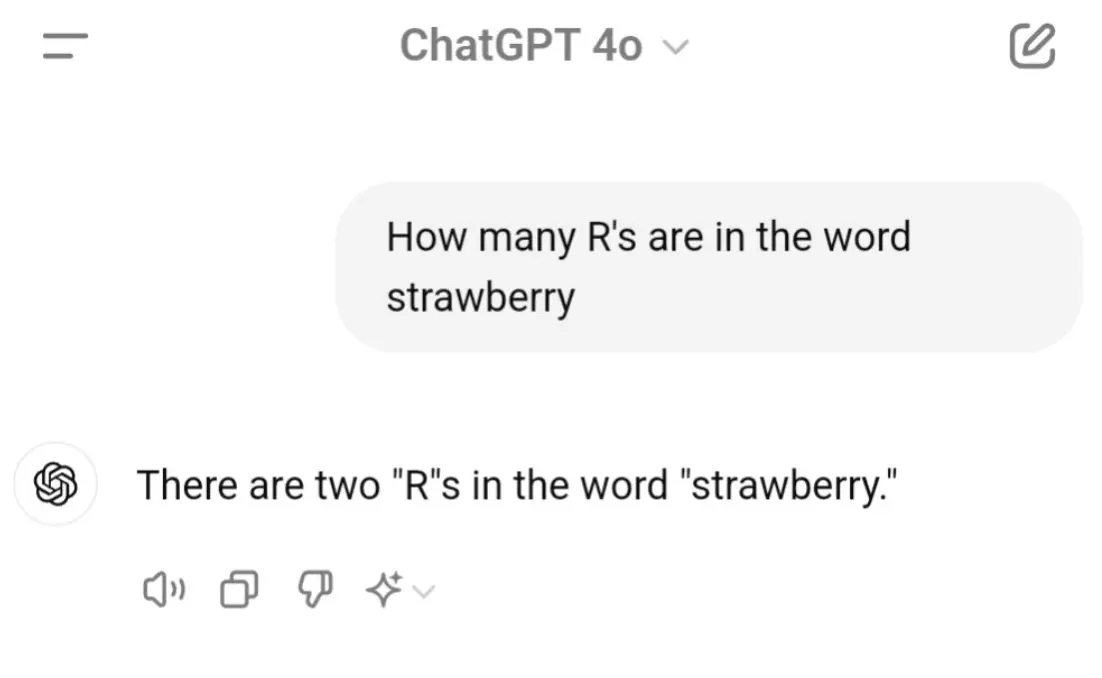
Get tokenization wrong and everything downstream gets affected. Tokenization is in fact at the heart of much weirdness of LLMs. So do not brush it off.
- Why can’t LLM spell words? Tokenization.
- Why can’t LLM do super simple string processing tasks like reversing a string? Tokenization.
- Why is LLM worse at non-English languages (e.g. Japanese)? Tokenization.
- Why is LLM bad at simple arithmetic? Tokenization.
- Why did GPT-2 have more than necessary trouble coding in Python? Tokenization.
- Why did my LLM abruptly halt when it sees the string “<|endoftext|>”? Tokenization.
- What is this weird warning I get about a “trailing whitespace”? Tokenization.
- Why the LLM break if I ask it about “SolidGoldMagikarp”? Tokenization.
- Why should I prefer to use YAML over JSON with LLMs? Tokenization.
- Why is LLM not actually end-to-end language modeling? Tokenization.
- What is the real root of suffering? Tokenization.
Brief overview to how LLMs are created
The general process of creating an LLM includes pretraining and fine-tuning. The “pre” in “pretraining” refers to the initial phase where a model like an LLM is trained on a large, diverse dataset to develop a broad understanding of language. This pretrained model then serves as a foundational resource that can be further refined through fine-tuning, a process where the model is specifically trained on a narrower dataset that is more specific to particular tasks or domains. This two-stage training approach consisting of pretraining and fine-tuning is depicted below:

This first training stage of an LLM is also known as pretraining, creating an initial pretrained LLM, often called a base or foundation model.
Foundation models are built on large corpora of text, sometimes referred to as raw text. Here, “raw” refers to the fact that this data is just regular text i.e. \(D = \{x_i\}_{i=1}^I\) without any labeling information \(y_i\).
A typical example of such a model is the GPT-3 model (the precursor of the original model offered in ChatGPT). This model is capable of text completion—that is, finishing a half-written sentence provided by a user. It also has limited few-shot capabilities, which means it can learn to perform new tasks based on only a few examples instead of needing extensive training data.
Table below summarizes the dataset used for pretraining GPT-3, which served as the base model for the first version of ChatGPT:
| Dataset name | Dataset description | Number of tokens | Proportion in training data |
|---|---|---|---|
| CommonCrawl (raw) / FineWeb (cleaned) | Web crawl data | 410 billion | 60% |
| WebText2 | Web crawl data | 19 billion | 22% |
| Books1 | Internet-based book corpus | 12 billion | 8% |
| Books2 | Internet-based book corpus | 55 billion | 8% |
| Wikipedia | High-quality text | 3 billion | 3% |
Proportion = sampling weight during training, not corpus size fraction.
A few properties of this raw text matter enormously for how we process it:
- It’s unfathomably large. Pretraining corpora for frontier models run into trillions of tokens. Whatever pipeline you build to turn text into model input has to be simple and fast enough to scale to that volume — this is precisely the “big data” angle of this project (see Part 4).
- It’s multilingual and multi-script. A web crawl contains English, Urdu, Mandarin, emoji, mathematical notation, and more, often mixed in the same document.
- It’s inconsistently encoded and dirty. HTML fragments, broken encodings, unusual whitespace, and mixed scripts all show up in real crawled data.
- The model itself only understands numbers. Whatever text arrives, it eventually has to become a fixed-size vocabulary of integer ids that a neural network’s embedding layer can look up.
The tokenizer is the component that absorbs all of this messiness and produces a clean, bounded, numeric interface for the model. Getting it right (or wrong) has outsized downstream effects — it’s often the most under-appreciated part of an LLM’s pipeline.
Unicode, UTF-8 and their usage in Tokenization
Unicode is a single, universal standard that assigns every character in (almost) every writing system in the world a unique number, called a code point — e.g. the letter “A” is U+0041, the Urdu letter “ب” is U+0628, and the emoji “🚀” is U+1F680.
U+ simply indicates that this number belongs to Unicode code-point system and it is followed by the code point itself in hexadecimal.
Before Unicode, different encodings (ASCII, Latin-1, Shift-JIS, etc.) assigned different numbers to characters, so text produced under one encoding could turn to garbage when read under another. Unicode’s goal is to have one namespace big enough (over 1.1 million possible code points) to represent every character anyone might want to write.
Because raw internet text contains many languages, scripts, symbols, and emoji, Unicode gives us a common standard by assigning each character a unique code point.
txt = "안녕하세요 👋 (hello in Korean!)"

[ord(char) for char in txt]
Unicode itself only defines which number means which character — it doesn’t say how those numbers are stored as bytes on disk or transmitted over a network. Using Unicode code points directly as an LLM’s basic vocabulary would require a large and evolving set of more than 100,000 possible characters.
An encoding like UTF-8 solves this problem by encoding every Unicode character as a sequence drawn from only 256 possible byte values. A byte-level tokenizer can therefore represent any Unicode text using a small, fixed foundation.
UTF-8 represents each Unicode code point as a sequence of 1 to 4 bytes: - Code points 0–127 (basic ASCII: English letters, digits, punctuation) → 1 byte - Many other alphabets (Latin accents, Greek, Cyrillic, Arabic, Urdu, Hebrew) → 2 bytes - Most of the common CJK (Chinese/Japanese/Korean) range → 3 bytes - Emoji and some rarer scripts → 4 bytes
Therefore most modern tokenizers operate on the UTF-8 byte representation of the text, the base vocabulary is always exactly 256 possible values (0-255), regardless of what languages, emoji, or scripts appear in the data. Since UTF-8 can represent any valid Unicode text as a byte sequence, a byte-level tokenizer can represent any text in any language without ever hitting an unknown/OOV token.
BPE then learns merges on top of these 256 base bytes, building up a vocabulary of common multi-byte sequences (which, for common languages, end up looking a lot like whole characters, common subwords, or even common whole words) up to whatever vocab_size you choose.
This is exactly the trick behind GPT-2’s tokenizer, and it’s why you’ll implement get_stats/merge operating on lists of byte values, not characters, in Part 1 below.
txt = "안녕하세요 👋 (hello in Korean!)"
btes = list(txt.encode("utf-8"))print(f"{'char':<8} {'unicode':<10} {'utf-8 bytes'}")
print("-" * 40)
for char in txt:
print(f"{repr(char):<8} {ord(char):<10} {str(list(char.encode('utf-8')))}")char unicode utf-8 bytes
----------------------------------------
'안' 50504 [236, 149, 136]
'녕' 45397 [235, 133, 149]
'하' 54616 [237, 149, 152]
'세' 49464 [236, 132, 184]
'요' 50836 [236, 154, 148]
' ' 32 [32]
'👋' 128075 [240, 159, 145, 139]
' ' 32 [32]
'(' 40 [40]
'h' 104 [104]
'e' 101 [101]
'l' 108 [108]
'l' 108 [108]
'o' 111 [111]
' ' 32 [32]
'i' 105 [105]
'n' 110 [110]
' ' 32 [32]
'K' 75 [75]
'o' 111 [111]
'r' 114 [114]
'e' 101 [101]
'a' 97 [97]
'n' 110 [110]
'!' 33 [33]
')' 41 [41]A longer example with more realistic byte statistics.
# text from https://www.reedbeta.com/blog/programmers-intro-to-unicode/
text = "Unicode! 🅤🅝🅘🅒🅞🅓🅔‽ 🇺🇳🇮🇨🇴🇩🇪! 😄 The very name strikes fear and awe into the hearts of programmers worldwide. \
We all know we ought to “support Unicode” in our software (whatever that means—like using wchar_t for all the strings, right?). \
But Unicode can be abstruse, and diving into the thousand-page Unicode Standard plus its dozens of supplementary annexes, reports, \
and notes can be more than a little intimidating. I don’t blame programmers for still finding the whole thing mysterious, \
even 30 years after Unicode’s inception."
tokens = text.encode("utf-8") # raw bytes
tokens = list(map(int, tokens)) # convert to a list of integers in range 0..255 for convenience
print('---')
print(text)
print("length:", len(text))
print('---')
print(tokens)
print("length:", len(tokens))Unicode gives every character a standardized code point, and UTF-8 converts those code points into bytes. This gives us a universal way to represent text from different languages, writing systems, and symbol sets using only 256 possible byte values.
In principle, we could give these UTF-8 bytes directly to an LLM. That would guarantee that the model could represent any valid text. However, it would also be inefficient: common words and phrases would be broken into long sequences of individual bytes, consuming more of the model’s limited context window and requiring more computational steps.
This creates a tradeoff. We want the universal coverage of bytes, but we also want the efficiency of representing common patterns as larger units. Tokenization provides that intermediate layer. A tokenizer groups the underlying bytes into reusable chunks called tokens and assigns each token an integer ID that the model can process.
Byte Pair Encoding (BPE)
The next question is how the tokenizer decides which byte sequences should become tokens. One widely used method is Byte Pair Encoding, or BPE. BPE starts with individual bytes and repeatedly finds frequently occurring adjacent pairs. It merges those pairs into new tokens, gradually building a vocabulary in which common text patterns receive compact representations while uncommon text can still fall back to its original bytes.
1. Count Pairs
Count consecutive byte pairs in UTF-8 encoded text sequences
Given a list of integer token ids, return a dict counting how many times each adjacent pair (ids[i], ids[i+1]) occurs.
Example:
get_stats([1, 2, 3, 1, 2])
returns
{(1, 2): 2,
(2, 3): 1,
(3, 1): 1}
If counts is provided, accumulate into it instead of a fresh dict (useful when counting stats across multiple chunks, e.g. after regex pre-splitting). For example:
counts = get_stats([1, 2, 3, 1, 2])
get_stats([1, 2, 3, 1, 2], counts)
returns
{(1, 2): 4,
(2, 3): 2,
(3, 1): 2}
def get_stats(ids: list, counts: dict = None) -> dict:
    # TODO: implement
    raise NotImplementedError
stats = get_stats(tokens)
# Two ways to print most frequent pair:
# print(stats)
# print(sorted(((v,k) for k,v in stats.items()), reverse=True))
top_pair = max(stats, key=stats.get)
top_pair2. Merge
Replace every occurrence of pair (a tuple of two adjacent ids) in ids with the single id new_id. Return the new list.
def merge(ids: list, pair: tuple, new_id: int) -> list:
    """
    Example:
        merge([1, 2, 3, 1, 2], (1, 2), 99) -> [99, 3, 99]
    """
    # TODO: implement
raise NotImplementedErrorprint(merge([5, 6, 6, 7, 9, 1], (6, 7), 99))
tokens2 = merge(tokens, top_pair, 256)
print(tokens2)
print("length:", len(tokens2))3. Iterative Merging
Once we can count adjacent pairs (get_stats) and replace them (merge), Byte Pair Encoding (BPE) “trains” by repeating these steps in a greedy loop:
Count frequencies: Scan the current sequence of token IDs and count how often every adjacent pair \((A, B)\) appears.
Find the top pair: Select the pair with the highest frequency count.
Mint a new token ID: Assign the most frequent pair the next available integer ID (starting at 256, right after the single-byte range 0–255).
Replace and repeat: Replace all occurrences of that pair throughout the text with the new ID, record the merge rule, and repeat the process until the target vocabulary size (vocab_size) is reached or no pairs remain.
# making the training text longer to have more representative token statistics
# text from https://www.reedbeta.com/blog/programmers-intro-to-unicode/
text = """A Programmer’s Introduction to Unicode March 3, 2017 · Coding · 22 Comments  Unicode! 🅤🅝🅘🅒🅞🅓🅔‽ 🇺\u200c🇳\u200c🇮\u200c🇨\u200c🇴\u200c🇩\u200c🇪! 😄 The very name strikes fear and awe into the hearts of programmers worldwide. We all know we ought to “support Unicode” in our software (whatever that means—like using wchar_t for all the strings, right?). But Unicode can be abstruse, and diving into the thousand-page Unicode Standard plus its dozens of supplementary annexes, reports, and notes can be more than a little intimidating. I don’t blame programmers for still finding the whole thing mysterious, even 30 years after Unicode’s inception.  A few months ago, I got interested in Unicode and decided to spend some time learning more about it in detail. In this article, I’ll give an introduction to it from a programmer’s point of view.  I’m going to focus on the character set and what’s involved in working with strings and files of Unicode text. However, in this article I’m not going to talk about fonts, text layout/shaping/rendering, or localization in detail—those are separate issues, beyond my scope (and knowledge) here.  Diversity and Inherent Complexity The Unicode Codespace Codespace Allocation Scripts Usage Frequency Encodings UTF-8 UTF-16 Combining Marks Canonical Equivalence Normalization Forms Grapheme Clusters And More… Diversity and Inherent Complexity As soon as you start to study Unicode, it becomes clear that it represents a large jump in complexity over character sets like ASCII that you may be more familiar with. It’s not just that Unicode contains a much larger number of characters, although that’s part of it. Unicode also has a great deal of internal structure, features, and special cases, making it much more than what one might expect a mere “character set” to be. We’ll see some of that later in this article.  When confronting all this complexity, especially as an engineer, it’s hard not to find oneself asking, “Why do we need all this? Is this really necessary? Couldn’t it be simplified?”  However, Unicode aims to faithfully represent the entire world’s writing systems. The Unicode Consortium’s stated goal is “enabling people around the world to use computers in any language”. And as you might imagine, the diversity of written languages is immense! To date, Unicode supports 135 different scripts, covering some 1100 languages, and there’s still a long tail of over 100 unsupported scripts, both modern and historical, which people are still working to add.  Given this enormous diversity, it’s inevitable that representing it is a complicated project. Unicode embraces that diversity, and accepts the complexity inherent in its mission to include all human writing systems. It doesn’t make a lot of trade-offs in the name of simplification, and it makes exceptions to its own rules where necessary to further its mission.  Moreover, Unicode is committed not just to supporting texts in any single language, but also to letting multiple languages coexist within one text—which introduces even more complexity.  Most programming languages have libraries available to handle the gory low-level details of text manipulation, but as a programmer, you’ll still need to know about certain Unicode features in order to know when and how to apply them. It may take some time to wrap your head around it all, but don’t be discouraged—think about the billions of people for whom your software will be more accessible through supporting text in their language. Embrace the complexity!  The Unicode Codespace Let’s start with some general orientation. The basic elements of Unicode—its “characters”, although that term isn’t quite right—are called code points. Code points are identified by number, customarily written in hexadecimal with the prefix “U+”, such as U+0041 “A” latin capital letter a or U+03B8 “θ” greek small letter theta. Each code point also has a short name, and quite a few other properties, specified in the Unicode Character Database.  The set of all possible code points is called the codespace. The Unicode codespace consists of 1,114,112 code points. However, only 128,237 of them—about 12% of the codespace—are actually assigned, to date. There’s plenty of room for growth! Unicode also reserves an additional 137,468 code points as “private use” areas, which have no standardized meaning and are available for individual applications to define for their own purposes.  Codespace Allocation To get a feel for how the codespace is laid out, it’s helpful to visualize it. Below is a map of the entire codespace, with one pixel per code point. It’s arranged in tiles for visual coherence; each small square is 16×16 = 256 code points, and each large square is a “plane” of 65,536 code points. There are 17 planes altogether.  Map of the Unicode codespace (click to zoom)  White represents unassigned space. Blue is assigned code points, green is private-use areas, and the small red area is surrogates (more about those later). As you can see, the assigned code points are distributed somewhat sparsely, but concentrated in the first three planes.  Plane 0 is also known as the “Basic Multilingual Plane”, or BMP. The BMP contains essentially all the characters needed for modern text in any script, including Latin, Cyrillic, Greek, Han (Chinese), Japanese, Korean, Arabic, Hebrew, Devanagari (Indian), and many more.  (In the past, the codespace was just the BMP and no more—Unicode was originally conceived as a straightforward 16-bit encoding, with only 65,536 code points. It was expanded to its current size in 1996. However, the vast majority of code points in modern text belong to the BMP.)  Plane 1 contains historical scripts, such as Sumerian cuneiform and Egyptian hieroglyphs, as well as emoji and various other symbols. Plane 2 contains a large block of less-common and historical Han characters. The remaining planes are empty, except for a small number of rarely-used formatting characters in Plane 14; planes 15–16 are reserved entirely for private use.  Scripts Let’s zoom in on the first three planes, since that’s where the action is:  Map of scripts in Unicode planes 0–2 (click to zoom)  This map color-codes the 135 different scripts in Unicode. You can see how Han () and Korean () take up most of the range of the BMP (the left large square). By contrast, all of the European, Middle Eastern, and South Asian scripts fit into the first row of the BMP in this diagram.  Many areas of the codespace are adapted or copied from earlier encodings. For example, the first 128 code points of Unicode are just a copy of ASCII. This has clear benefits for compatibility—it’s easy to losslessly convert texts from smaller encodings into Unicode (and the other direction too, as long as no characters outside the smaller encoding are used).  Usage Frequency One more interesting way to visualize the codespace is to look at the distribution of usage—in other words, how often each code point is actually used in real-world texts. Below is a heat map of planes 0–2 based on a large sample of text from Wikipedia and Twitter (all languages). Frequency increases from black (never seen) through red and yellow to white.  Heat map of code point usage frequency in Unicode planes 0–2 (click to zoom)  You can see that the vast majority of this text sample lies in the BMP, with only scattered usage of code points from planes 1–2. The biggest exception is emoji, which show up here as the several bright squares in the bottom row of plane 1.  Encodings We’ve seen that Unicode code points are abstractly identified by their index in the codespace, ranging from U+0000 to U+10FFFF. But how do code points get represented as bytes, in memory or in a file?  The most convenient, computer-friendliest (and programmer-friendliest) thing to do would be to just store the code point index as a 32-bit integer. This works, but it consumes 4 bytes per code point, which is sort of a lot. Using 32-bit ints for Unicode will cost you a bunch of extra storage, memory, and performance in bandwidth-bound scenarios, if you work with a lot of text.  Consequently, there are several more-compact encodings for Unicode. The 32-bit integer encoding is officially called UTF-32 (UTF = “Unicode Transformation Format”), but it’s rarely used for storage. At most, it comes up sometimes as a temporary internal representation, for examining or operating on the code points in a string.  Much more commonly, you’ll see Unicode text encoded as either UTF-8 or UTF-16. These are both variable-length encodings, made up of 8-bit or 16-bit units, respectively. In these schemes, code points with smaller index values take up fewer bytes, which saves a lot of memory for typical texts. The trade-off is that processing UTF-8/16 texts is more programmatically involved, and likely slower.  UTF-8 In UTF-8, each code point is stored using 1 to 4 bytes, based on its index value.  UTF-8 uses a system of binary prefixes, in which the high bits of each byte mark whether it’s a single byte, the beginning of a multi-byte sequence, or a continuation byte; the remaining bits, concatenated, give the code point index. This table shows how it works:  UTF-8 (binary)\tCode point (binary)\tRange 0xxxxxxx\txxxxxxx\tU+0000–U+007F 110xxxxx 10yyyyyy\txxxxxyyyyyy\tU+0080–U+07FF 1110xxxx 10yyyyyy 10zzzzzz\txxxxyyyyyyzzzzzz\tU+0800–U+FFFF 11110xxx 10yyyyyy 10zzzzzz 10wwwwww\txxxyyyyyyzzzzzzwwwwww\tU+10000–U+10FFFF A handy property of UTF-8 is that code points below 128 (ASCII characters) are encoded as single bytes, and all non-ASCII code points are encoded using sequences of bytes 128–255. This has a couple of nice consequences. First, any strings or files out there that are already in ASCII can also be interpreted as UTF-8 without any conversion. Second, lots of widely-used string programming idioms—such as null termination, or delimiters (newlines, tabs, commas, slashes, etc.)—will just work on UTF-8 strings. ASCII bytes never occur inside the encoding of non-ASCII code points, so searching byte-wise for a null terminator or a delimiter will do the right thing.  Thanks to this convenience, it’s relatively simple to extend legacy ASCII programs and APIs to handle UTF-8 strings. UTF-8 is very widely used in the Unix/Linux and Web worlds, and many programmers argue UTF-8 should be the default encoding everywhere.  However, UTF-8 isn’t a drop-in replacement for ASCII strings in all respects. For instance, code that iterates over the “characters” in a string will need to decode UTF-8 and iterate over code points (or maybe grapheme clusters—more about those later), not bytes. When you measure the “length” of a string, you’ll need to think about whether you want the length in bytes, the length in code points, the width of the text when rendered, or something else.  UTF-16 The other encoding that you’re likely to encounter is UTF-16. It uses 16-bit words, with each code point stored as either 1 or 2 words.  Like UTF-8, we can express the UTF-16 encoding rules in the form of binary prefixes:  UTF-16 (binary)\tCode point (binary)\tRange xxxxxxxxxxxxxxxx\txxxxxxxxxxxxxxxx\tU+0000–U+FFFF 110110xxxxxxxxxx 110111yyyyyyyyyy\txxxxxxxxxxyyyyyyyyyy + 0x10000\tU+10000–U+10FFFF A more common way that people talk about UTF-16 encoding, though, is in terms of code points called “surrogates”. All the code points in the range U+D800–U+DFFF—or in other words, the code points that match the binary prefixes 110110 and 110111 in the table above—are reserved specifically for UTF-16 encoding, and don’t represent any valid characters on their own. They’re only meant to occur in the 2-word encoding pattern above, which is called a “surrogate pair”. Surrogate code points are illegal in any other context! They’re not allowed in UTF-8 or UTF-32 at all.  Historically, UTF-16 is a descendant of the original, pre-1996 versions of Unicode, in which there were only 65,536 code points. The original intention was that there would be no different “encodings”; Unicode was supposed to be a straightforward 16-bit character set. Later, the codespace was expanded to make room for a long tail of less-common (but still important) Han characters, which the Unicode designers didn’t originally plan for. Surrogates were then introduced, as—to put it bluntly—a kludge, allowing 16-bit encodings to access the new code points.  Today, Javascript uses UTF-16 as its standard string representation: if you ask for the length of a string, or iterate over it, etc., the result will be in UTF-16 words, with any code points outside the BMP expressed as surrogate pairs. UTF-16 is also used by the Microsoft Win32 APIs; though Win32 supports either 8-bit or 16-bit strings, the 8-bit version unaccountably still doesn’t support UTF-8—only legacy code-page encodings, like ANSI. This leaves UTF-16 as the only way to get proper Unicode support in Windows. (Update: in Win10 version 1903, they finally added UTF-8 support to the 8-bit APIs! 😊)  By the way, UTF-16’s words can be stored either little-endian or big-endian. Unicode has no opinion on that issue, though it does encourage the convention of putting U+FEFF zero width no-break space at the top of a UTF-16 file as a byte-order mark, to disambiguate the endianness. (If the file doesn’t match the system’s endianness, the BOM will be decoded as U+FFFE, which isn’t a valid code point.)  Combining Marks In the story so far, we’ve been focusing on code points. But in Unicode, a “character” can be more complicated than just an individual code point!  Unicode includes a system for dynamically composing characters, by combining multiple code points together. This is used in various ways to gain flexibility without causing a huge combinatorial explosion in the number of code points.  In European languages, for example, this shows up in the application of diacritics to letters. Unicode supports a wide range of diacritics, including acute and grave accents, umlauts, cedillas, and many more. All these diacritics can be applied to any letter of any alphabet—and in fact, multiple diacritics can be used on a single letter.  If Unicode tried to assign a distinct code point to every possible combination of letter and diacritics, things would rapidly get out of hand. Instead, the dynamic composition system enables you to construct the character you want, by starting with a base code point (the letter) and appending additional code points, called “combining marks”, to specify the diacritics. When a text renderer sees a sequence like this in a string, it automatically stacks the diacritics over or under the base letter to create a composed character.  For example, the accented character “Á” can be expressed as a string of two code points: U+0041 “A” latin capital letter a plus U+0301 “◌́” combining acute accent. This string automatically gets rendered as a single character: “Á”.  Now, Unicode does also include many “precomposed” code points, each representing a letter with some combination of diacritics already applied, such as U+00C1 “Á” latin capital letter a with acute or U+1EC7 “ệ” latin small letter e with circumflex and dot below. I suspect these are mostly inherited from older encodings that were assimilated into Unicode, and kept around for compatibility. In practice, there are precomposed code points for most of the common letter-with-diacritic combinations in European-script languages, so they don’t use dynamic composition that much in typical text.  Still, the system of combining marks does allow for an arbitrary number of diacritics to be stacked on any base character. The reductio-ad-absurdum of this is Zalgo text, which works by ͖͟ͅr͞aṋ̫̠̖͈̗d͖̻̹óm̪͙͕̗̝ļ͇̰͓̳̫ý͓̥̟͍ ̕s̫t̫̱͕̗̰̼̘͜a̼̩͖͇̠͈̣͝c̙͍k̖̱̹͍͘i̢n̨̺̝͇͇̟͙ģ̫̮͎̻̟ͅ ̕n̼̺͈͞u̮͙m̺̭̟̗͞e̞͓̰̤͓̫r̵o̖ṷs҉̪͍̭̬̝̤ ̮͉̝̞̗̟͠d̴̟̜̱͕͚i͇̫̼̯̭̜͡ḁ͙̻̼c̲̲̹r̨̠̹̣̰̦i̱t̤̻̤͍͙̘̕i̵̜̭̤̱͎c̵s ͘o̱̲͈̙͖͇̲͢n͘ ̜͈e̬̲̠̩ac͕̺̠͉h̷̪ ̺̣͖̱ḻ̫̬̝̹ḙ̙̺͙̭͓̲t̞̞͇̲͉͍t̷͔̪͉̲̻̠͙e̦̻͈͉͇r͇̭̭̬͖,̖́ ̜͙͓̣̭s̘̘͈o̱̰̤̲ͅ ̛̬̜̙t̼̦͕̱̹͕̥h̳̲͈͝ͅa̦t̻̲ ̻̟̭̦̖t̛̰̩h̠͕̳̝̫͕e͈̤̘͖̞͘y҉̝͙ ̷͉͔̰̠o̞̰v͈͈̳̘͜er̶f̰͈͔ḻ͕̘̫̺̲o̲̭͙͠ͅw̱̳̺ ͜t̸h͇̭͕̳͍e̖̯̟̠ ͍̞̜͔̩̪͜ļ͎̪̲͚i̝̲̹̙̩̹n̨̦̩̖ḙ̼̲̼͢ͅ ̬͝s̼͚̘̞͝p͙̘̻a̙c҉͉̜̤͈̯̖i̥͡n̦̠̱͟g̸̗̻̦̭̮̟ͅ ̳̪̠͖̳̯̕a̫͜n͝d͡ ̣̦̙ͅc̪̗r̴͙̮̦̹̳e͇͚̞͔̹̫͟a̙̺̙ț͔͎̘̹ͅe̥̩͍ a͖̪̜̮͙̹n̢͉̝ ͇͉͓̦̼́a̳͖̪̤̱p̖͔͔̟͇͎͠p̱͍̺ę̲͎͈̰̲̤̫a̯͜r̨̮̫̣̘a̩̯͖n̹̦̰͎̣̞̞c̨̦̱͔͎͍͖e̬͓͘ ̤̰̩͙̤̬͙o̵̼̻̬̻͇̮̪f̴ ̡̙̭͓͖̪̤“̸͙̠̼c̳̗͜o͏̼͙͔̮r̞̫̺̞̥̬ru̺̻̯͉̭̻̯p̰̥͓̣̫̙̤͢t̳͍̳̖ͅi̶͈̝͙̼̙̹o̡͔n̙̺̹̖̩͝ͅ”̨̗͖͚̩.̯͓  A few other places where dynamic character composition shows up in Unicode:  Vowel-pointing notation in Arabic and Hebrew. In these languages, words are normally spelled with some of their vowels left out. They then have diacritic notation to indicate the vowels (used in dictionaries, language-teaching materials, children’s books, and such). These diacritics are expressed with combining marks.  A Hebrew example, with niqqud:\tאֶת דַלְתִּי הֵזִיז הֵנִיעַ, קֶטֶב לִשְׁכַּתִּי יָשׁוֹד Normal writing (no niqqud):\tאת דלתי הזיז הניע, קטב לשכתי ישוד Devanagari, the script used to write Hindi, Sanskrit, and many other South Asian languages, expresses certain vowels as combining marks attached to consonant letters. For example, “ह” + “\u200bि” = “हि” (“h” + “i” = “hi”). Korean characters stand for syllables, but they are composed of letters called jamo that stand for the vowels and consonants in the syllable. While there are code points for precomposed Korean syllables, it’s also possible to dynamically compose them by concatenating their jamo. For example, “ᄒ” + “ᅡ” + “ᆫ” = “한” (“h” + “a” + “n” = “han”). Canonical Equivalence In Unicode, precomposed characters exist alongside the dynamic composition system. A consequence of this is that there are multiple ways to express “the same” string—different sequences of code points that result in the same user-perceived characters. For example, as we saw earlier, we can express the character “Á” either as the single code point U+00C1, or as the string of two code points U+0041 U+0301.  Another source of ambiguity is the ordering of multiple diacritics in a single character. Diacritic order matters visually when two diacritics apply to the same side of the base character, e.g. both above: “ǡ” (dot, then macron) is different from “ā̇” (macron, then dot). However, when diacritics apply to different sides of the character, e.g. one above and one below, then the order doesn’t affect rendering. Moreover, a character with multiple diacritics might have one of the diacritics precomposed and others expressed as combining marks.  For example, the Vietnamese letter “ệ” can be expressed in five different ways:  Fully precomposed: U+1EC7 “ệ” Partially precomposed: U+1EB9 “ẹ” + U+0302 “◌̂” Partially precomposed: U+00EA “ê” + U+0323 “◌̣” Fully decomposed: U+0065 “e” + U+0323 “◌̣” + U+0302 “◌̂” Fully decomposed: U+0065 “e” + U+0302 “◌̂” + U+0323 “◌̣” Unicode refers to set of strings like this as “canonically equivalent”. Canonically equivalent strings are supposed to be treated as identical for purposes of searching, sorting, rendering, text selection, and so on. This has implications for how you implement operations on text. For example, if an app has a “find in file” operation and the user searches for “ệ”, it should, by default, find occurrences of any of the five versions of “ệ” above!  Normalization Forms To address the problem of “how to handle canonically equivalent strings”, Unicode defines several normalization forms: ways of converting strings into a canonical form so that they can be compared code-point-by-code-point (or byte-by-byte).  The “NFD” normalization form fully decomposes every character down to its component base and combining marks, taking apart any precomposed code points in the string. It also sorts the combining marks in each character according to their rendered position, so e.g. diacritics that go below the character come before the ones that go above the character. (It doesn’t reorder diacritics in the same rendered position, since their order matters visually, as previously mentioned.)  The “NFC” form, conversely, puts things back together into precomposed code points as much as possible. If an unusual combination of diacritics is called for, there may not be any precomposed code point for it, in which case NFC still precomposes what it can and leaves any remaining combining marks in place (again ordered by rendered position, as in NFD).  There are also forms called NFKD and NFKC. The “K” here refers to compatibility decompositions, which cover characters that are “similar” in some sense but not visually identical. However, I’m not going to cover that here.  Grapheme Clusters As we’ve seen, Unicode contains various cases where a thing that a user thinks of as a single “character” might actually be made up of multiple code points under the hood. Unicode formalizes this using the notion of a grapheme cluster: a string of one or more code points that constitute a single “user-perceived character”.  UAX #29 defines the rules for what, precisely, qualifies as a grapheme cluster. It’s approximately “a base code point followed by any number of combining marks”, but the actual definition is a bit more complicated; it accounts for things like Korean jamo, and emoji ZWJ sequences.  The main thing grapheme clusters are used for is text editing: they’re often the most sensible unit for cursor placement and text selection boundaries. Using grapheme clusters for these purposes ensures that you can’t accidentally chop off some diacritics when you copy-and-paste text, that left/right arrow keys always move the cursor by one visible character, and so on.  Another place where grapheme clusters are useful is in enforcing a string length limit—say, on a database field. While the true, underlying limit might be something like the byte length of the string in UTF-8, you wouldn’t want to enforce that by just truncating bytes. At a minimum, you’d want to “round down” to the nearest code point boundary; but even better, round down to the nearest grapheme cluster boundary. Otherwise, you might be corrupting the last character by cutting off a diacritic, or interrupting a jamo sequence or ZWJ sequence.  And More… There’s much more that could be said about Unicode from a programmer’s perspective! I haven’t gotten into such fun topics as case mapping, collation, compatibility decompositions and confusables, Unicode-aware regexes, or bidirectional text. Nor have I said anything yet about implementation issues—how to efficiently store and look-up data about the sparsely-assigned code points, or how to optimize UTF-8 decoding, string comparison, or NFC normalization. Perhaps I’ll return to some of those things in future posts.  Unicode is a fascinating and complex system. It has a many-to-one mapping between bytes and code points, and on top of that a many-to-one (or, under some circumstances, many-to-many) mapping between code points and “characters”. It has oddball special cases in every corner. But no one ever claimed that representing all written languages was going to be easy, and it’s clear that we’re never going back to the bad old days of a patchwork of incompatible encodings.  Further reading:  The Unicode Standard UTF-8 Everywhere Manifesto Dark corners of Unicode by Eevee ICU (International Components for Unicode)—C/C++/Java libraries implementing many Unicode algorithms and related things Python 3 Unicode Howto Google Noto Fonts—set of fonts intended to cover all assigned code points"""
tokens = text.encode("utf-8") # raw bytes
tokens = list(map(int, tokens)) # convert to a list of integers in range 0..255 for convenience# ---
vocab_size = 276 # the desired final vocabulary size
num_merges = vocab_size - 256
ids = list(tokens) # copy so we don't destroy the original list
merges = {}
# Insert your iterative merging code hereprint("tokens length:", len(tokens))
print("ids length:", len(ids))
print(f"compression ratio: {len(tokens) / len(ids):.2f}X")4. Decoding
Given a sequence of integers in the range [0, vocab_size], what is the text?
"""This maps each integer from 0 to 255 to a single byte:
vocab[65]   # b"A"
vocab[97]   # b"a"
vocab[128]  # b"\x80"
"""
vocab = {idx: bytes([idx]) for idx in range(256)}

"""
Add tokens made by merging existing tokens
for example,
if
merges = {(104, 105): 256}
then
vocab[256] = b"h" + b"i"  # b"hi"

Token ID 256 now represents two bytes.
The loop assumes each token’s components already exist in vocab.
"""
for (p0, p1), idx in merges.items():
    vocab[idx] = vocab[p0] + vocab[p1]

def decode(ids):
  """
  This looks up each token’s bytes and joins them with no separator. For example:
  decode([104, 105])  # "hi"
  decode([256])      # "hi", using the example merge above
  """
  tokens = b"".join(vocab[idx] for idx in ids)

  #interprets the combined bytes as UTF-8 text. Invalid byte sequences are replaced with �.
  text = tokens.decode("utf-8", errors="replace")
  return text

print(decode([128]))

"""The key distinction: a token ID is not a Unicode character number.
Here, token ID 128 represents the raw byte 0x80, which is invalid UTF-8 on its own.
decode([128])       # "�"
decode([194, 128])  # "\x80" — valid UTF-8 for a nonprinting control character
"""
5. Encoding
The other way around: Given a string, what are the tokens?
def encode(text):
  # given a string, return list of integers (the tokens)
  raise NotImplementedError

print(encode(""))print(decode(encode("hello world")))
text2 = decode(encode(text))
print(text2 == text)
valtext = "Many common characters, including numerals, punctuation, and other symbols, are unified within the standard and are not treated as specific to any given writing system. Unicode encodes thousands of emoji, with the continued development thereof conducted by the Consortium as a part of the standard.[4] Moreover, the widespread adoption of Unicode was in large part responsible for the initial popularization of emoji outside of Japan. Unicode is ultimately capable of encoding more than 1.1 million characters."
valtext2 = decode(encode(valtext))
print(valtext2 == valtext)6. Regex Pattern Splitting
Regular Expressions (Regex) are a mini-language for defining search patterns in text. Instead of searching for an exact word like “cat”, regex lets you search for broad categories—such as “any number”, “a sequence of letters”, or “three digits followed by punctuation”.
re.compile(pattern) translates your regex pattern string into a reusable, compiled regex object. Compiling the pattern once avoids re-parsing the regex syntax on every search. In tokenizers where text is split millions of times, compiling first provides a noticeable speed boost.
re.findall(pattern, text) scans the target text from left to right and extracts all non-overlapping substrings that match the pattern, returning them as a Python list of strings.
Models like GPT-2 and GPT-4 prevent certain character classes from merging across category boundaries (e.g., punctuation, numbers, contractions, whitespace) using regex patterns prior to applying BPE merges.
After splitting the text, you process each chunk independently and then concatenate the resulting token IDs into a single list.
|
If you are curious following are key regex symbols Used in the tokenizer
|
import regex as re
gpt2pat = re.compile(r"""'s|'t|'re|'ve|'m|'ll|'d| ?\p{L}+| ?\p{N}+| ?[^\s\p{L}\p{N}]+|\s+(?!\S)|\s+""")

print(re.findall(gpt2pat, "Hello've world123 how's are you!!!?"))
example = """
for i in range(1, 101):
if i % 3 == 0 and i % 5 == 0:
print("FizzBuzz")
elif i % 3 == 0:
print("Fizz")
elif i % 5 == 0:
print("Buzz")
else:
print(i)
"""
print(re.findall(gpt2pat, example))7. Special tokens
Special tokens are control symbols that tell the model structure and context—most famously <|endoftext|>, which marks where a training document ends and a new one begins.
<|endoftext|> is the only special token in use for the GPT-2 base model.
Unlike regular words or punctuation, special tokens must never be chopped up or merged with other text.
If you pass <|endoftext|> into standard BPE, the regex pattern will chop it up into punctuation and words: ['<|', 'endoftext', '|>'].
The BPE encoder will break those into bytes and look up individual subword merges.
It ends up encoded as several token IDs instead of a single reserved control token.
Furthermore, if <|endoftext|> sits right next to another word (e.g., <|endoftext|>Hello), standard BPE might try to merge > and H together into a new pair.
To prevent this, tokenizers treat special tokens as atomic entities outside normal BPE.
In your BPETokenizer, handling special tokens involves three steps:
- Registration
You map the special token string to an ID outside the normal byte/merge range:
tokenizer.register_special_tokens({"<|endoftext|>": 50256})- Encoding (
encode)
Before applying regex pre-splitting and BPE merges, you slice the raw text by the special token so it remains completely untouched:
# Create a pattern matching the special token, e.g. "(<\|endoftext\|>)"
specials_pattern = "(" + "|".join(re.escape(s) for s in self.special_tokens) + ")"

tokens = []
# re.split keeps the delimiter if wrapped in parentheses ()
for part in re.split(specials_pattern, text):
    if part in self.special_tokens:
        # Directly insert the single special ID without touching BPE
        tokens.append(self.special_tokens[part])
    elif part:
        # Run normal regex splitting + BPE on regular text chunks
tokens.extend(self._encode_ordinary(part))- Decoding (
decode)
When decoding a list of IDs back to text:
Check if an ID belongs to
self.vocab(decode to bytes).If not, check an inverted special token map (
{50256: "<|endoftext|>"}) and append the string directly as UTF-8 bytes.
special_tokens = {'<|endoftext|>'}

## TODO: Update your implementation of encode and decode code here that account for `special_tokens`
8. Tokenizer class
At this point you have everything you need to build your own GPT-4 tokenizer.
Write the BPETokenizer class, with the following four core functions:
def train(self, text, vocab_size, verbose=False)def encode(self, text)def decode(self, ids)def register_special_tokens(self, tokens)
Train your tokenizer on taylorswift.txt and inspect the merged tokens. Do they look reasonable?
Use the regex pattern below to split the text exactly as GPT-4 would.
Process the parts separately as before, then concatenate the results.
You should see that you will now have no tokens that go across categories (numbers, letters, punctuation, more than one whitespace).
Use the GPT-4 pattern:
GPT4_SPLIT_PATTERN = r"""'(?i:[sdmt]|ll|ve|re)|[^\r\n\p{L}\p{N}]?+\p{L}+|\p{N}{1,3}| ?[^\s\p{L}\p{N}]++[\r\n]*|\s*[\r\n]|\s+(?!\S)|\s+""""""
Starter code. Fill in every function marked TODO.
Do not change function signatures -- the autograder depends on them.
"""
import regex as re # pip install regex (supports \p{L} unicode classes; stdlib `re` does not)
from collections import defaultdict
# GPT-2 style pre-tokenization pattern (from the GPT-2 paper / tiktoken).
# Splits text into chunks BEFORE BPE is applied, so merges never cross
# these boundaries (e.g. a word merging into following punctuation).
GPT2_SPLIT_PATTERN = r"""'s|'t|'re|'ve|'m|'ll|'d| ?\p{L}+| ?\p{N}+| ?[^\s\p{L}\p{N}]+|\s+(?!\S)|\s+"""
GPT4_SPLIT_PATTERN = r"""'(?i:[sdmt]|ll|ve|re)|[^\r\n\p{L}\p{N}]?+\p{L}+|\p{N}{1,3}| ?[^\s\p{L}\p{N}]++[\r\n]*|\s*[\r\n]|\s+(?!\S)|\s+"""
SPECIAL_TOKEN = "<|endoftext|>"
class BPETokenizer:
"""A minimal byte-level BPE tokenizer"""
def __init__(self):
# merges: maps (id1, id2) -> new_id, in the order they were learned
self.merges = {}
# vocab: maps id -> bytes object (for decoding)
self.vocab = {idx: bytes([idx]) for idx in range(256)}
self.special_tokens = {}
def train(self, text: str, vocab_size: int, verbose: bool = False) -> None:
"""
Train the tokenizer on `text` until the vocabulary reaches `vocab_size`.
Steps:
1. Pre-split `text` using GPT2_SPLIT_PATTERN (re.findall).
2. Convert each chunk to a list of its UTF-8 byte values.
3. Repeatedly: count pair stats across ALL chunks, find the most
frequent pair, assign it the next available id, and merge it
within every chunk. Record the merge in self.merges and the
new vocab entry in self.vocab.
4. Stop when len(self.vocab) == vocab_size (or no pairs remain).
vocab_size must be >= 256 (the raw byte values).
"""
# TODO: implement
raise NotImplementedError
def encode(self, text: str) -> list:
"""
Encode `text` into a list of token ids using the learned merges.
Must handle the special token `<|endoftext|>` atomically (i.e. it
should never be split or merged into, and should map to its own
reserved id).
"""
# TODO: implement
raise NotImplementedError
def decode(self, ids: list) -> str:
"""
Decode a list of token ids back into a string.
Must satisfy: decode(encode(x)) == x for all valid input strings x.
"""
# TODO: implement
raise NotImplementedError
def register_special_tokens(self, tokens: dict) -> None:
"""Register special tokens, e.g. {'<|endoftext|>': 256+vocab_size}."""
self.special_tokens = tokens!wget https://raw.githubusercontent.com/karpathy/minbpe/refs/heads/master/tests/taylorswift.txt
content = ''
with open('taylorswift.txt') as f:
content = f.read()
tokenizer = BPETokenizer()
tokenizer.train(content, vocab_size=512, verbose=True)my_tokens = tokenizer.encode("안녕하세요 👋 (hello in Korean!)")len(my_tokens)Inspecting GPT-2 and GPT-4 Tokenizers
(In case you are wondering. GPT-3 just used GPT-2’s Tokenizer)
The tiktoken Library
tiktoken is an open-source, high-performance Byte Pair Encoding (BPE) tokenizer library engineered in Rust with Python bindings by OpenAI.
Unlike earlier pure-Python tokenization scripts that struggled with scaling to massive pretraining corpora, tiktoken processes text significantly faster—often orders of magnitude faster than standard tokenizers—through multithreading and efficient regex compilation.
It serves as the official inference tokenizer for contemporary OpenAI models, including GPT-3.5 and GPT-4 (cl100k_base), abstracting low-level byte-merging operations, greedy priority loops, and explicit control over special tokens such as <|endoftext|> through high-level encode and decode routines.
!pip install tiktokenGPT-2: Explicit Vocab and Merges
In the original GPT-2 implementation (referenced in OpenAI’s encoder.py), the vocabulary and merge rules are stored as two separate, human-readable files. The encoder.json file defines the model’s vocabulary of 50,257 tokens, mapping Unicode string representations directly to integer token IDs. Complementing this is vocab.bpe, which lists 50,000 ordered text merge rules sequentially. Before merging, GPT-2 maps each raw byte (0–255) to a visible Unicode character using a reversible lookup table. BPE merges are subsequently executed over these character representations, joining individual units into larger subwords and words (such as merging ‘Ġt’ and ‘he’ into ‘Ġthe’) strictly following the hierarchical order learned during training.
import tiktoken

# GPT-2 (does not merge spaces)
enc = tiktoken.get_encoding("gpt2")
print(enc.encode(" hello world!!!"))print(enc.decode(enc.encode(" hello world!!!")))Reference the GPT-2 encoder.py Download the vocab.bpe and encoder.json files.
!wget https://openaipublic.blob.core.windows.net/gpt-2/models/1558M/vocab.bpe
!wget https://openaipublic.blob.core.windows.net/gpt-2/models/1558M/encoder.json
import os, json
with open('encoder.json', 'r') as f:
vocab = json.load(f) # <--- ~equivalent to our "vocab"
with open('vocab.bpe', 'r', encoding="utf-8") as f:
bpe_data = f.read()
bpe_merges = [tuple(merge_str.split()) for merge_str in bpe_data.split('\n')[1:-1]]
# ^---- ~equivalent to our "merges"len(vocab)GPT-4: Unified _mergeable_ranks
Rather than maintaining decoupled text files or character maps, the GPT-4 tokenizer (cl100k_base) consolidates both vocabulary and merge recipes into a single, compact data structure: _mergeable_ranks. This table maps raw byte sequences directly to integer ranks across an expanded vocabulary of 100,256 tokens. The byte string keys define the vocabulary elements, while the integer values dictate the merge priority—tokens with lower ranks represent earlier BPE merges that take precedence during encoding. Operating natively on UTF-8 bytes alongside a modernized regex pattern that clusters multi-digit numbers and whitespace blocks efficiently, GPT-4 avoids the intermediate Unicode re-mapping steps of GPT-2 while packing more information into fewer tokens.
import tiktoken
enc = tiktoken.get_encoding("cl100k_base") # GPT-4 tokenizer
print(enc.encode("안녕하세요 👋 (hello in Korean!)"))
print(enc.decode(enc.encode("안녕하세요 👋 (hello in Korean!)")) == "안녕하세요 👋 (hello in Korean!)")
# GPT-2 (does not merge spaces)
enc = tiktoken.get_encoding("gpt2")
print(enc.encode(" hello world!!!"))
# GPT-4 (merges spaces)
enc = tiktoken.get_encoding("cl100k_base")
print(enc.encode(" hello world!!!"))You can easily recover what we call vocab here, and what they call and store under enc._mergeable_ranks.
Basically, under some conditions it is enough to only store the parent nodes (and their rank) and get rid of the precise details of which children merged up to any parent.
import tiktoken

enc_gpt4 = tiktoken.get_encoding("cl100k_base")

# Mergeable ranks serves as both vocab and merge priority
print(f"GPT-4 Mergeable Tokens: {len(enc_gpt4._mergeable_ranks)}") # 100,256

sample_tokens = list(enc_gpt4._mergeable_ranks.items())[256:270]

for token_bytes, rank in sample_tokens:
    print(f"Rank {rank:6d} -> {token_bytes!r}")
gpt4_vocab = {rank: token_bytes for token_bytes, rank in enc_gpt4._mergeable_ranks.items()}
print(f"Total vocabulary entries: {len(gpt4_vocab)}")
# Show a few recognizable subword and word tokens
sample_ids = [256, 257, 15339, 1917, 9906]
for idx in sample_ids:
print(f"Token ID {idx:6d} -> {gpt4_vocab[idx]!r}")Summary: Architecture Comparison
| Feature | Your BPETokenizer |
GPT-2 (r50k_base) |
GPT-4 (cl100k_base) |
|---|---|---|---|
| Vocab Size | Custom (e.g., 512) | 50,257 | 100,256 |
| Pre-split Regex | GPT4_SPLIT_PATTERN |
Character-level split regex | Modernized Unicode category regex |
| Merge Storage | In-memory self.merges |
Text file (vocab.bpe) |
Priority rank lookup (_mergeable_ranks) |
| Byte Representation | Native UTF-8 bytes | Byte-to-Unicode remapping | Byte-shuffled UTF-8 bytes |
| Special Tokens | Handled via regex partition | <\|endoftext\|> |
<\|endoftext\|>, FIM tokens, etc. |