"""
Skip-gram word2vec trained from scratch on text8, in PyTorch.

Pipeline:
  1. Download + unzip text8 (if not already present)
  2. Build vocabulary, subsample frequent words
  3. Generate (center, context) skip-gram pairs with negative sampling
  4. Train a skip-gram model with negative sampling loss
  5. Evaluate with word analogies (king - man + woman ~= queen)

Run:
  python word2vec_text8.py
"""

import os
import re
import zipfile
import urllib.request
import random

import numpy as np
import torch
import torch.nn as nn
import torch.nn.functional as F
from torch.utils.data import Dataset, DataLoader


DEVICE = torch.device("cuda" if torch.cuda.is_available() else "cpu")
Fall 2026
CSC-372 Project Part 3
Word2Vec, Embeddings and Representation Learning

Deep learning models — including LLMs — cannot process raw video, audio, or text directly. Instead, we transform this data into a dense, numerical vector that a network can operate on. The figure below shows raw data being converted into a three-dimensional vector.
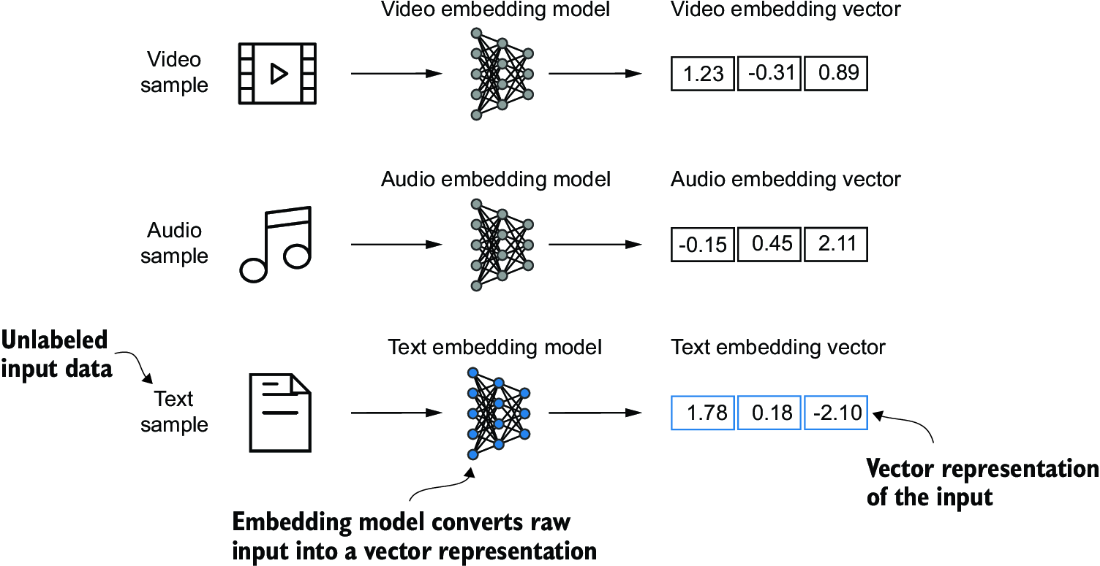
Converting data into vector form is called embedding.
So essentially, Embeddings place data (words, images, anything) as points in a continuous vector space. Their value comes from the relationships those vectors capture: a good representation makes patterns relevant to a task easier for a model to find.
A naive alternative — one-hot encoding, where each word gets a vector of all zeros except a single 1 — technically turns words into numbers too, but every word ends up equally distant from every other word. Embeddings are useful precisely because distance and direction in the vector space mean something.
For example, the word “cat” might become something like [0.2, -1.1, 0.8] — three numbers that, on their own, mean nothing, but whose relationship to the vectors for “dog” or “car” is what carries information.
Where do these representations come from? A central idea in neural networks is that useful representations emerge as a byproduct of training on a prediction task. We specify what to predict and how to score errors; as the model gets better at predicting, it also gets better at representing its inputs.
This holds across modalities. An image classifier, for instance, learns internal representations of visual patterns that support classification. Either way, the prediction objective is what shapes the representation.
Training doesn’t necessarily pull everything humans call “similar” together, or push “dissimilar” things apart. The relationships that emerge depend on the training data and the prediction task, not on human notions of meaning. “Hot” and “cold,” for example, can end up with similar vectors simply because they appear in similar contexts, despite being opposites. The space reflects what’s useful for prediction, not a universal definition of meaning.
Individual dimensions rarely have clean labels like “animal” or “size”, information is spread across many dimensions at once. Still, the relationships between vectors can reveal real structure, even when single coordinates can’t be interpreted.
Embeddings share a goal with dimensionality-reduction methods like PCA and t-SNE: all construct a space that exposes useful structure. What differs is the objective — PCA preserves variance, t-SNE preserves local neighborhoods, and neural embeddings are shaped by a prediction task. They don’t have to be lower-dimensional than the input; compactness isn’t what makes them useful.
The central lesson: learning to predict can also mean learning to represent. By optimizing a network for a prediction task, we get internal representations that capture real regularities in the data — without ever specifying what those representations should look like.
Personality Embeddings
Let’s start with an example to get familiar with using vectors to represent things.
Have you ever taken a personality test like the Big Five Personality Traits test? These are tests that ask you a list of questions, then score you on a number of axes, introversion/extraversion being one of them.
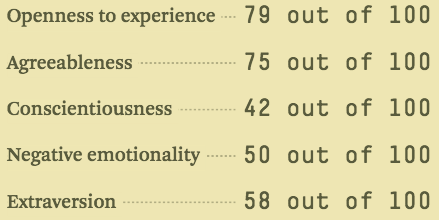
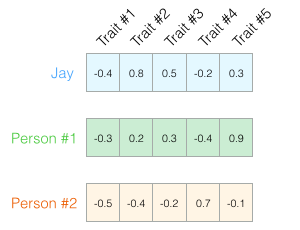
We can say that this vector of numbers represents a person. The usefulness of such representation comes when you want to compare two or more people.
We can easily calculate how similar vectors are to each other using a measure like euclidean distance or cosine similarity (angle between two vectors).
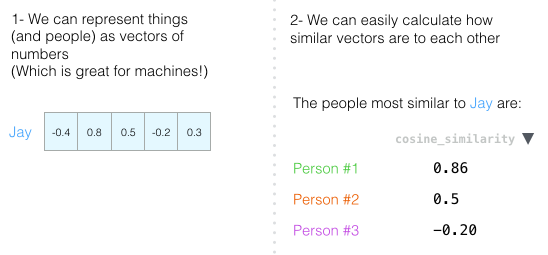
So the basic takeaways are that * Embeddings allow us to represent things as vectors of numbers. This is great for machines! * We can easily calculate how similar vectors are to each other.
Word Embeddings
Since our goal is to train GPT-like LLMs, which learn to generate text one word at a time, we will focus on word embeddings.
This is a word embedding for the word “king” (GloVe vector trained on Wikipedia):
[ 0.50451 , 0.68607 , -0.59517 , -0.022801, 0.60046 , -0.13498 , -0.08813 , 0.47377 , -0.61798 , -0.31012 , -0.076666, 1.493 , -0.034189, -0.98173 , 0.68229 , 0.81722 , -0.51874 , -0.31503 , -0.55809 , 0.66421 , 0.1961 , -0.13495 , -0.11476 , -0.30344 , 0.41177 , -2.223 , -1.0756 , -1.0783 , -0.34354 , 0.33505 , 1.9927 , -0.04234 , -0.64319 , 0.71125 , 0.49159 , 0.16754 , 0.34344 , -0.25663 , -0.8523 , 0.1661 , 0.40102 , 1.1685 , -1.0137 , -0.21585 , -0.15155 , 0.78321 , -0.91241 , -1.6106 , -0.64426 , -0.51042 ]
It’s a list of 50 numbers. We can’t tell much by looking at the values. But let’s visualize it a bit so we can compare it other word vectors. Let’s put all these numbers in one row:

Let’s color code the cells based on their values (red if they’re close to 2, white if they’re close to 0, blue if they’re close to -2):

We’ll proceed by ignoring the numbers and only looking at the colors to indicate the values of the cells. Let’s now contrast “King” against other words:
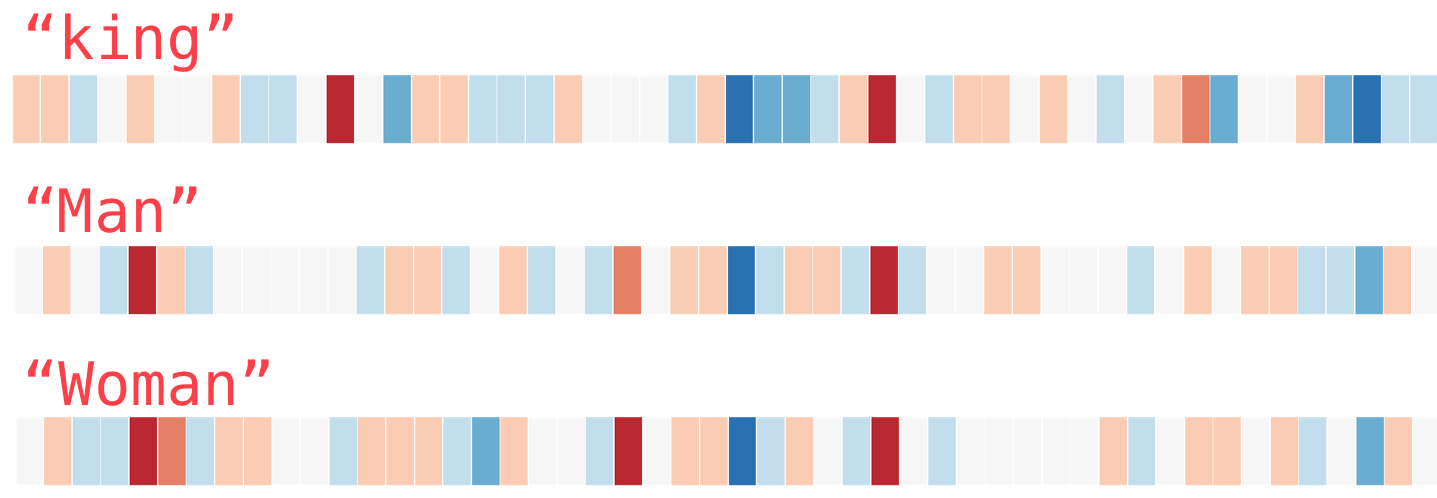
See how “Man” and “Woman” are much more similar to each other than either of them is to “king”? This tells you something. These vector representations capture quite a bit of the information/meaning/associations of these words.
Here’s another list of examples (compare by vertically scanning the columns looking for columns with similar colors):
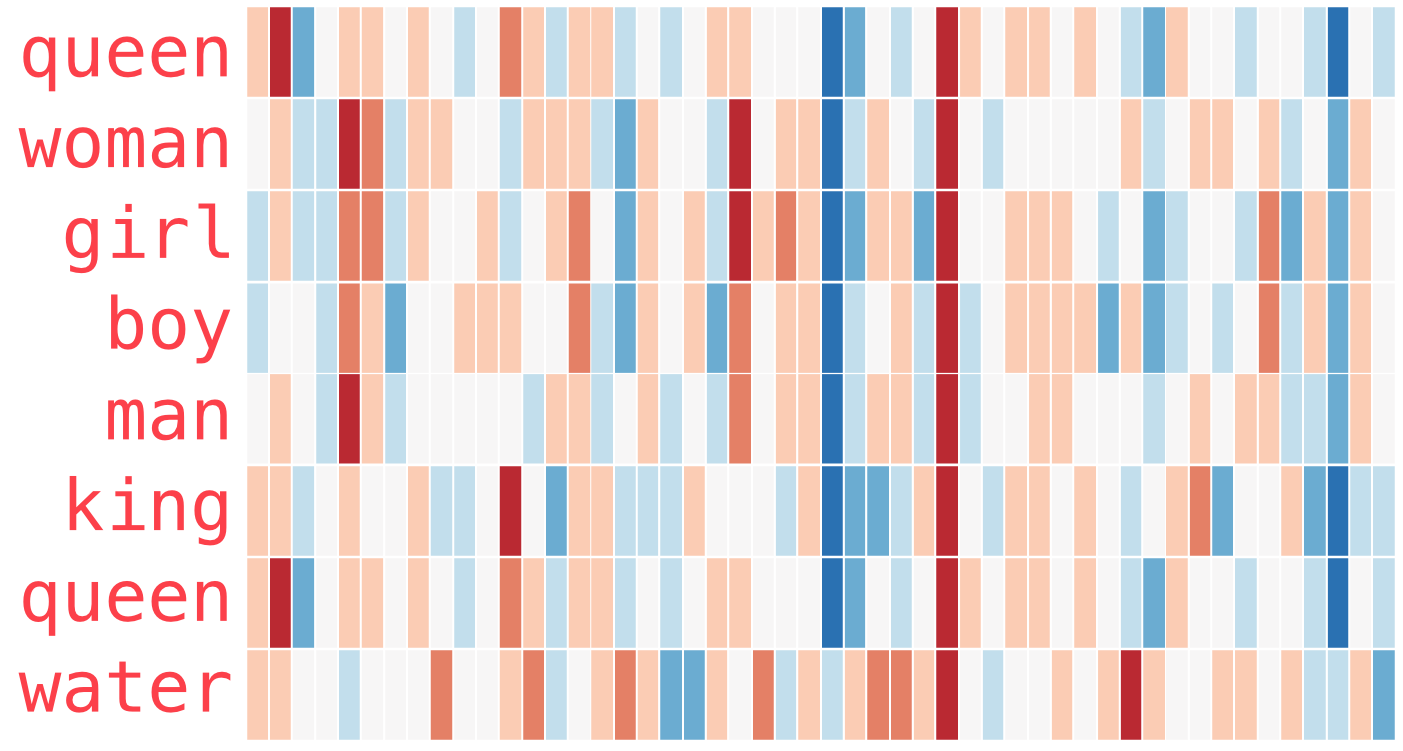
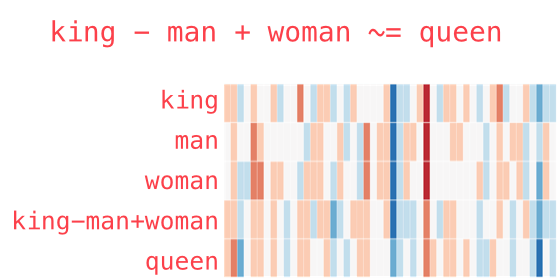
Once we have these embeddings, we can add and subtract word vectors and land at interesting results. The most famous example is: king - man + woman ~ queen
Word2Vec
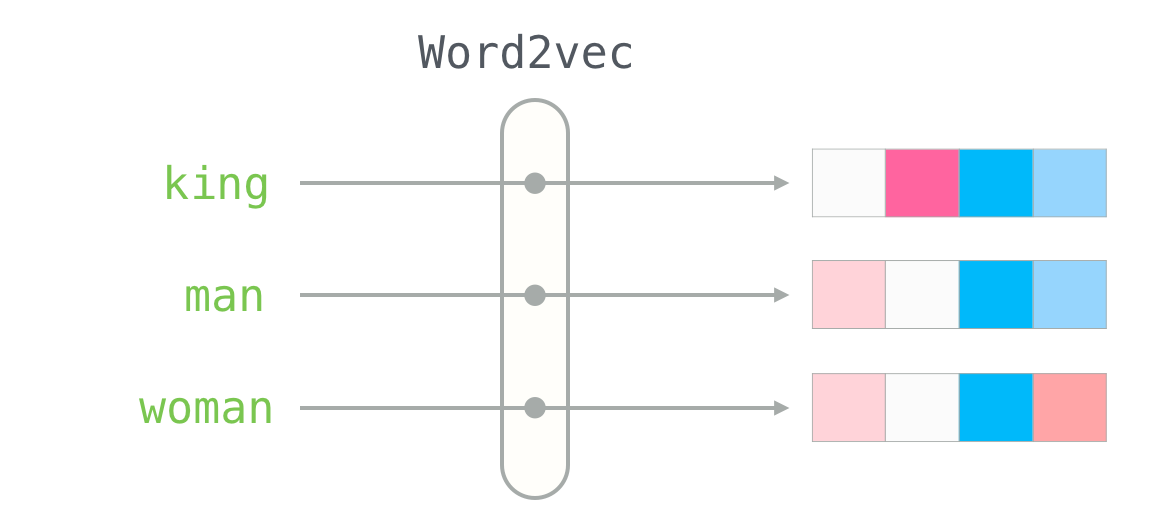
One of the earlier and most popular examples is the Word2Vec approach. The original paper is titled “Efficient Estimation of Word Representations in Vector Space” and can be accessed on arxiv here. One of the authors is Jeff Dean. Word2Vec trains neural networks to generate word embeddings by predicting the context of a word given the target word or vice versa.
The key insight behind Word2Vec is that words that appear in similar contexts tend to have similar meanings. Consequently, when projected into two-dimensional word embeddings for visualization purposes, similar terms are clustered together, as shown in figure below.
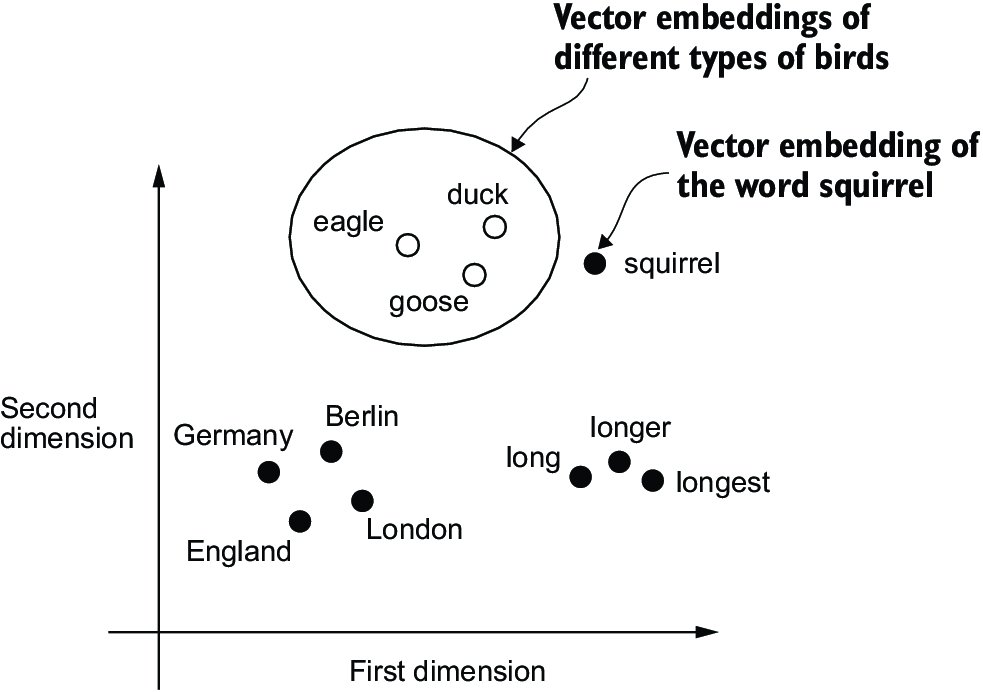
In its skip-gram formulation, the model uses a word to predict words that appear nearby in text. The training examples come directly from the text itself: words that occur together provide evidence about the contexts in which each word is used. No one needs to explicitly label “cat” and “dog” as similar. Instead, because these words often appear in similar contexts, learning to predict those contexts can produce vectors that capture their relationship.
The process begins with randomly initialized word vectors. At first, these vectors contain no learned information about how the words are used. During training, the model looks up the vectors, uses them to make predictions, and measures the resulting error. Backpropagation then adjusts the vectors, along with any other trainable parameters, to reduce that error. Repeated across many examples, these updates turn an initially arbitrary table of numbers into a useful representation of patterns in language.
This is representation learning: the model learns how to represent the data through the process of learning what to predict. The vectors are useful because they help solve the training task. Once learned, they can also be reused for other tasks, such as classification, clustering, or similarity search. This is why word embeddings are often described as “pretrained”: they are learned from one task and then reused for others. In fact, pretrained embeddings are publicly shared by big companies and research groups, so that others can benefit from the representations learned from large corpora. Some popular pretrained embeddings include GloVe, fastText, and BERT.
There are two ways to learn Word2Vec embddings:
- Continuous Bag of Words (CBOW): This version of Word2Vec is analogous to fill in the blank questions. That is, using two words before and two words after, we try and predict the ‘inner’ word.


- Skipgram
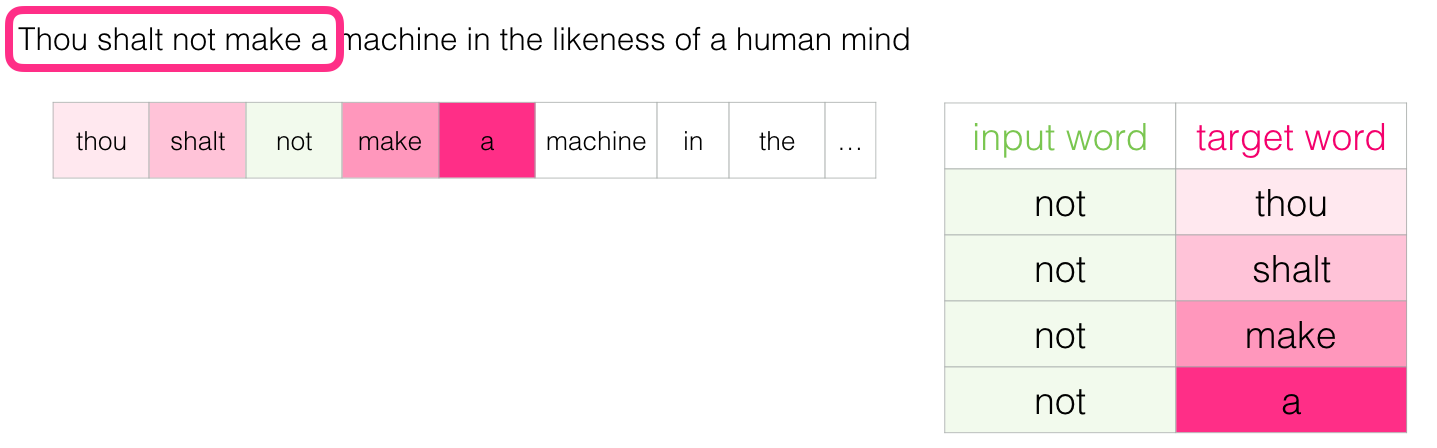
For the example sentence “Thou shalt not make a machine”, we use say not as the input word and its neighboring words as target words to predict.
We can visualize the sliding window as doing the following:

This would add these four samples to our training dataset:
We then slide our window to the next position:
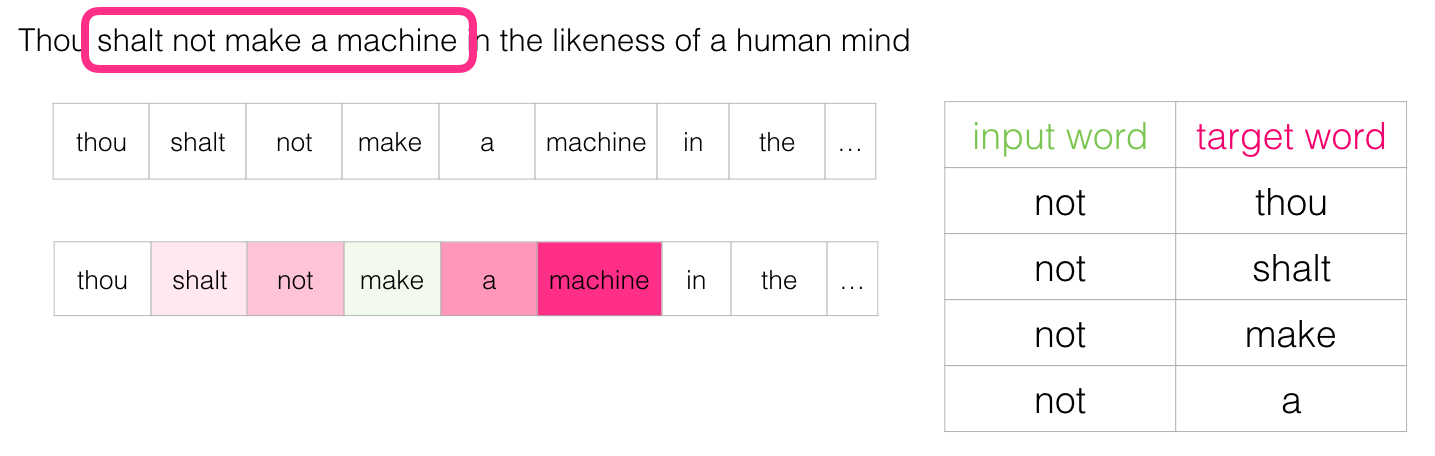
Which generates our next four examples:
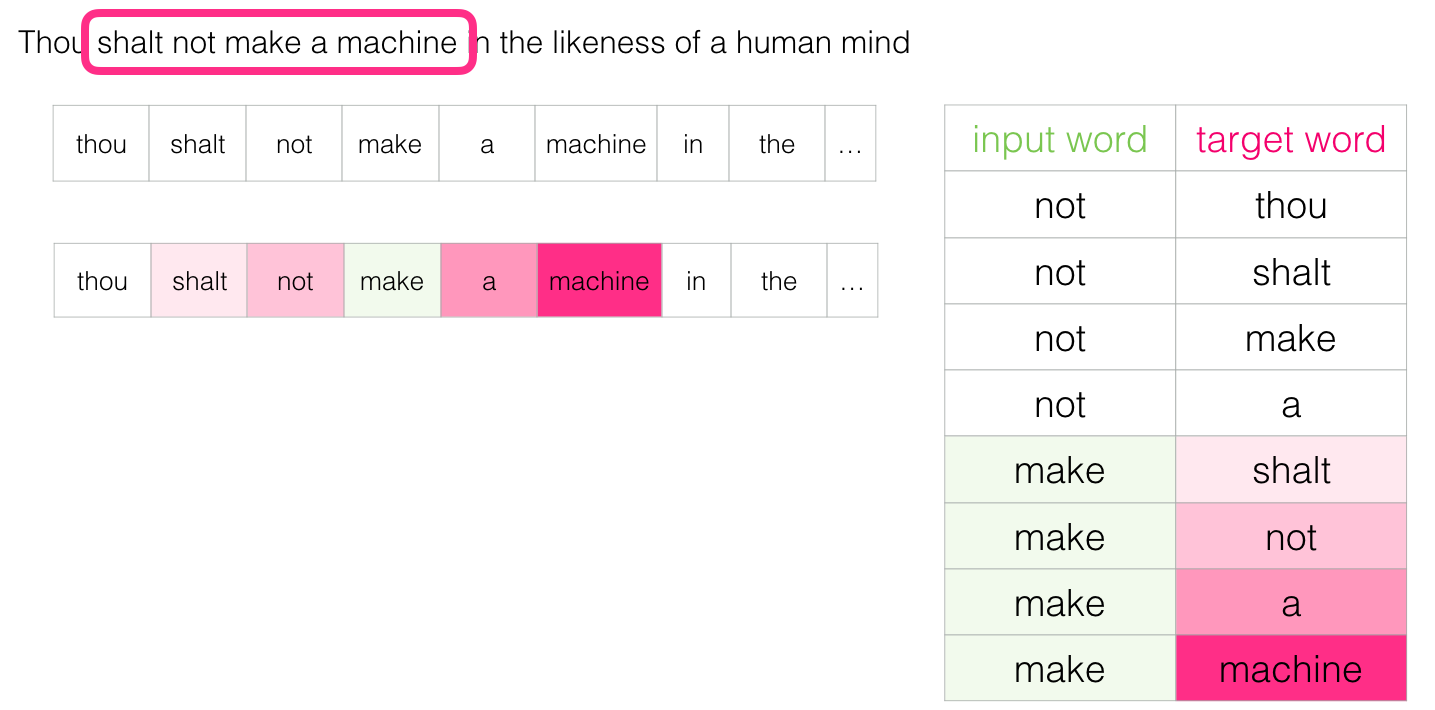
A couple of positions later, we have a lot more examples:
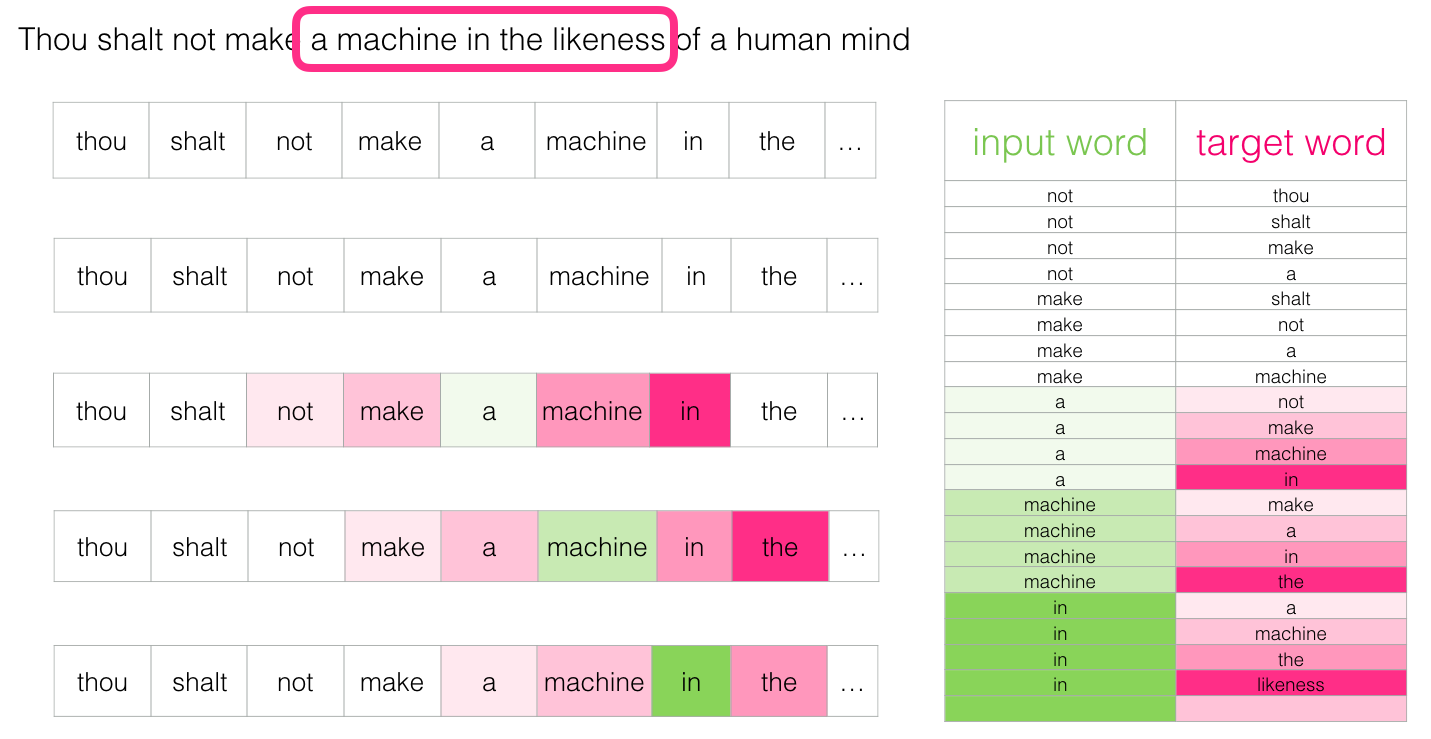
Now that we have our skipgram training dataset that we extracted from existing running text, let’s glance at how we use it to train a basic neural language model that predicts the neighboring word.
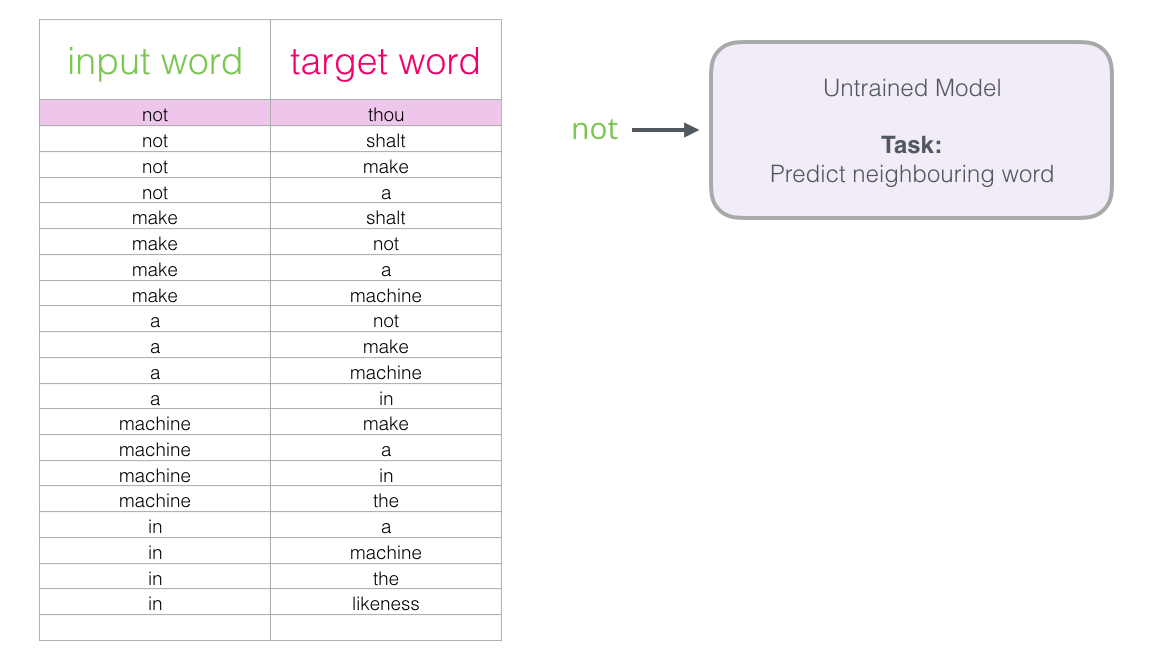
We start with the first sample in our dataset. We grab the feature and feed to the untrained model asking it to predict an appropriate neighboring word.
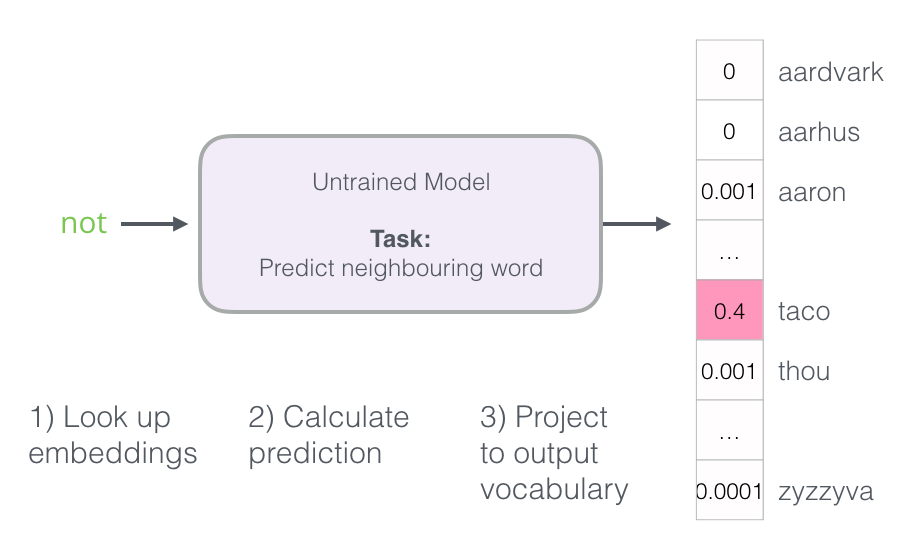
The model conducts the three steps and outputs a prediction vector (with a probability assigned to each word in its vocabulary). Since the model is untrained, it’s prediction is sure to be wrong at this stage. But that’s okay. We know what word it should have guessed – the label/output cell in the row we’re currently using to train the model:
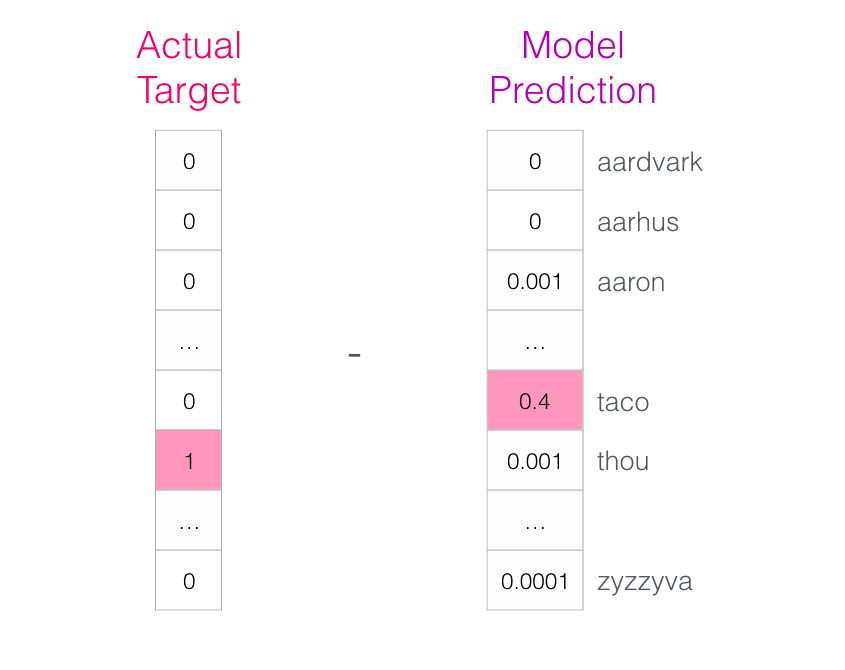
How far off was the model? We subtract the two vectors resulting in an error vector:
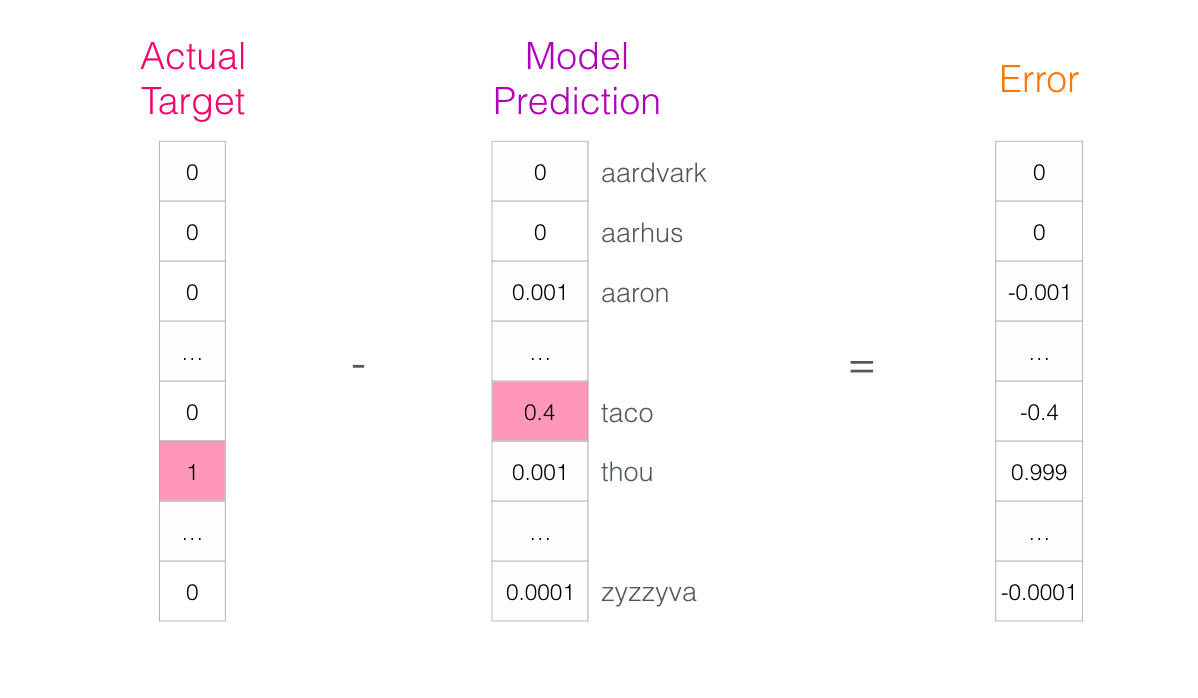
This error vector can now be used to update the model so the next time, it’s a little more likely to guess thou when it gets not as input.
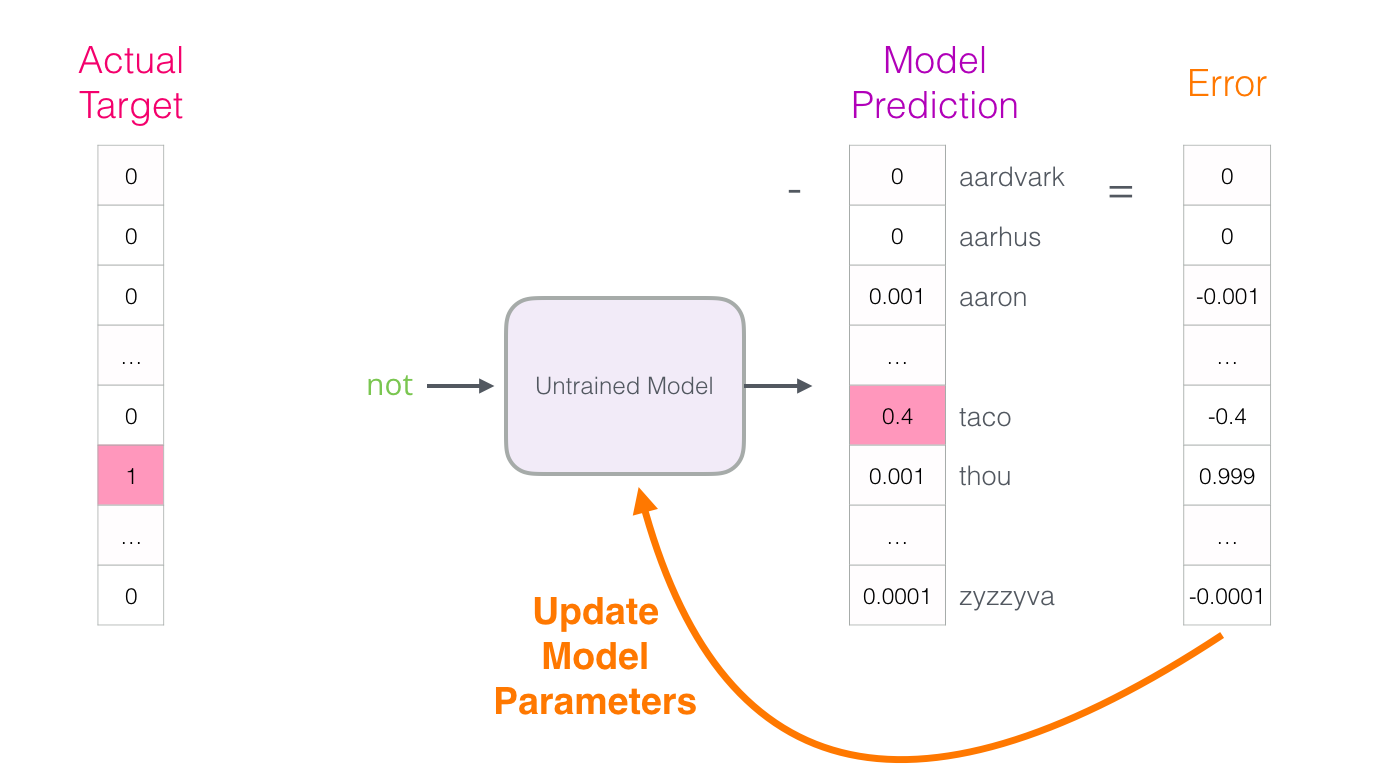
And that concludes the first step of the training. We proceed to do the same process with the next sample in our dataset, and then the next, until we’ve covered all the samples in the dataset. That concludes one epoch of training. We do it over again for a number of epochs, and then we’d have our trained model and we can extract the embedding matrix from it and use it for any other application.
While this extends our understanding of the process, it’s still not how word2vec is actually trained. We’re missing a couple of key ideas.
Negative Sampling
Recall the three steps of how this neural language model calculates its prediction:
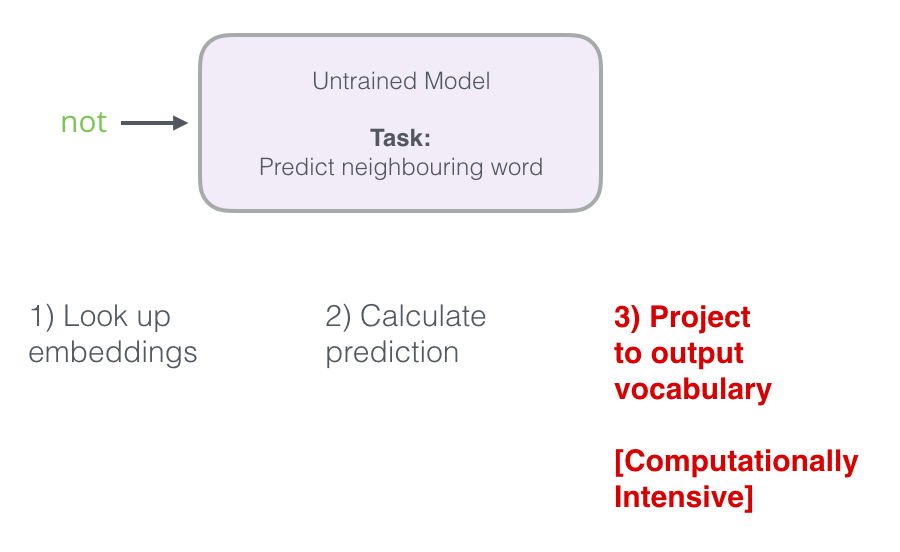
The third step is very expensive from a computational point of view – especially knowing that we will do it once for every training sample in our dataset (easily tens of millions of times). We need to do something to improve performance.
One way is to split our target into two steps:
Generate high-quality word embeddings (Don’t worry about next-word prediction). Use these high-quality embeddings to train a language model (to do next-word prediction). We’ll focus on step 1. in this post as we’re focusing on embeddings. To generate high-quality embeddings using a high-performance model, we can switch the model’s task from predicting a neighboring word:
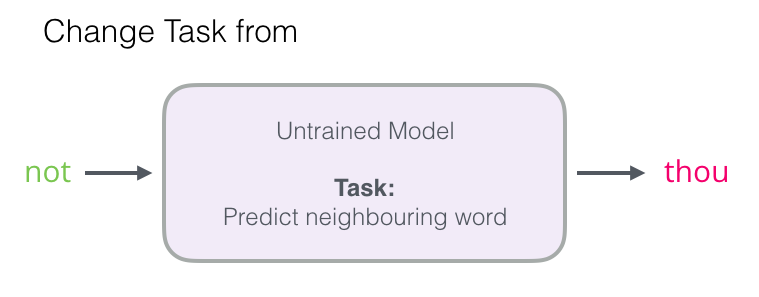
And switch it to a model that takes the input and output word, and outputs a score indicating if they’re neighbors or not (0 for “not neighbors”, 1 for “neighbors”).
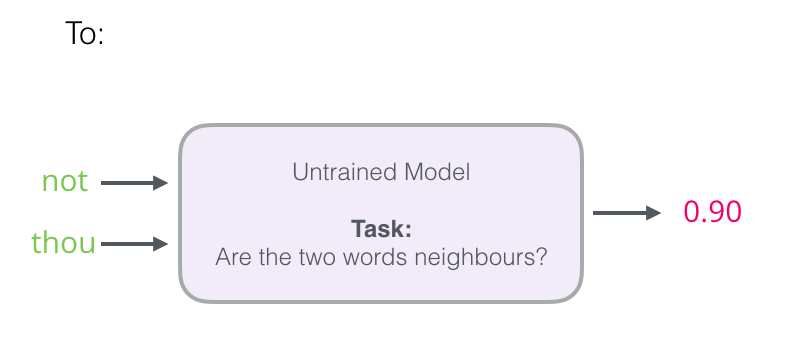
This simple switch changes the model we need from a neural network, to a logistic regression model – thus it becomes much simpler and much faster to calculate.
This switch requires we switch the structure of our dataset – the label is now a new column with values 0 or 1. They will be all 1 since all the words we added are neighbors.
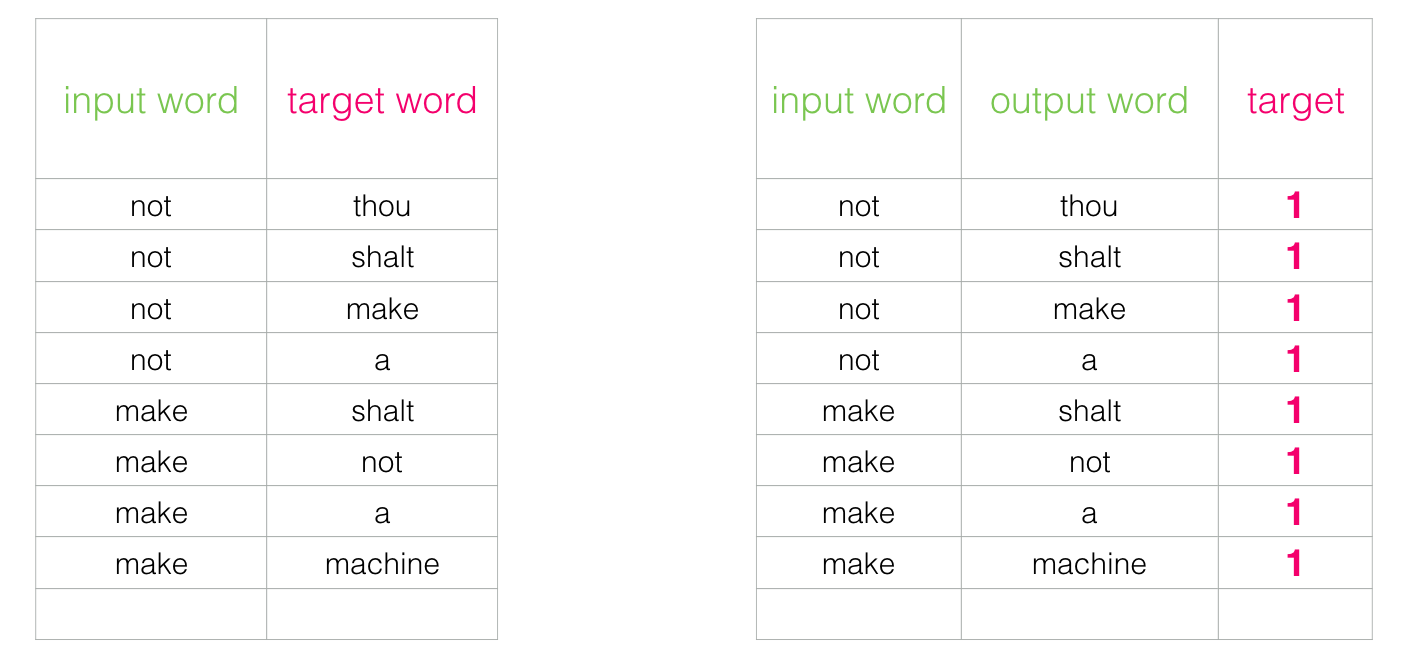
This can now be computed at blazing speed – processing millions of examples in minutes. But there’s one loophole we need to close. If all of our examples are positive (target: 1), we open ourself to the possibility of a smartass model that always returns 1 – achieving 100% accuracy, but learning nothing and generating garbage embeddings.
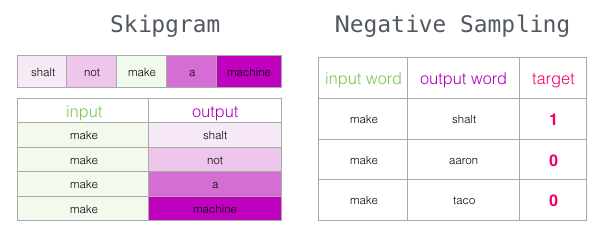
To address this, we need to introduce negative samples to our dataset – samples of words that are not neighbors. Our model needs to return 0 for those samples. Now that’s a challenge that the model has to work hard to solve – but still at blazing fast speed.
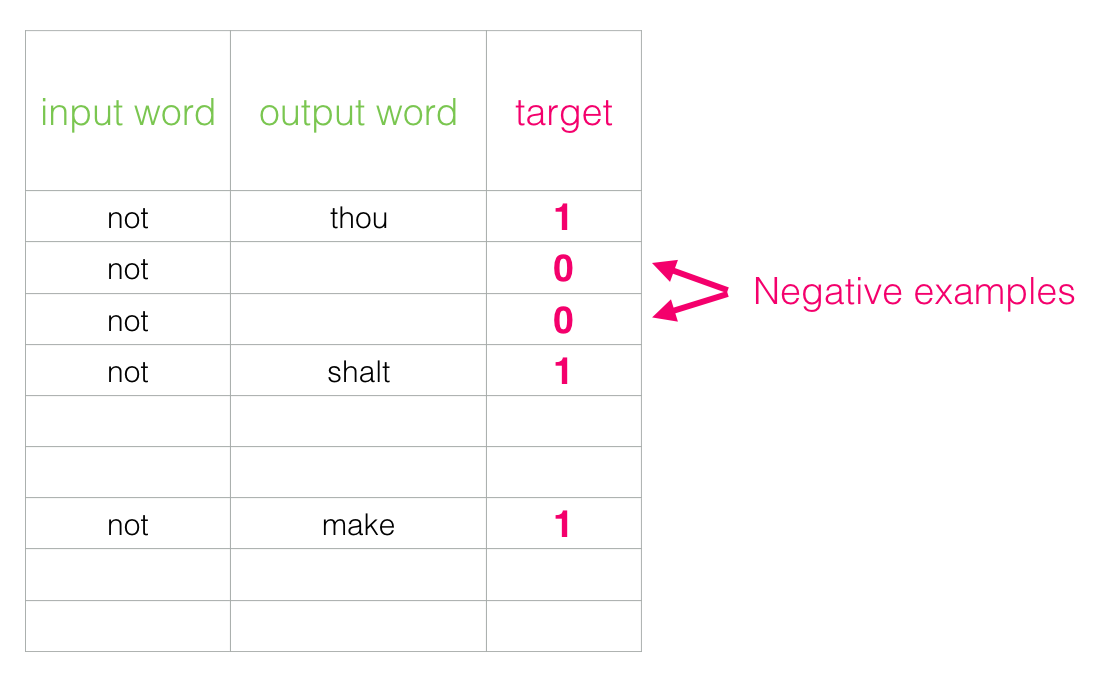
But what do we fill in as output words? We randomly sample words from our vocabulary
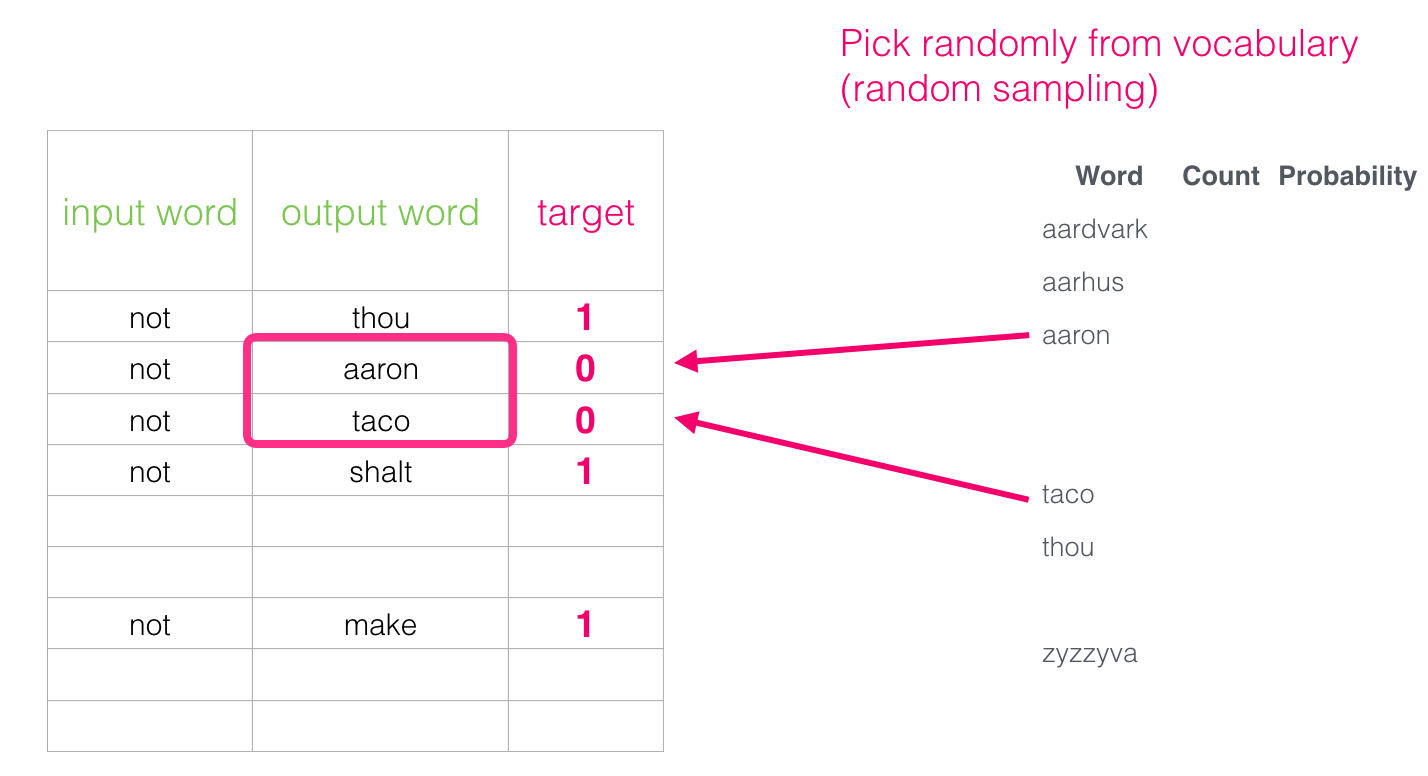
This idea is inspired by Noise-contrastive estimation [pdf]. We are contrasting the actual signal (positive examples of neighboring words) with noise (randomly selected words that are not neighbors). This leads to a great tradeoff of computational and statistical efficiency.
Skipgram with Negative Sampling (SGNS)
We have now covered two of the central ideas in word2vec: as a pair, they’re called skipgram with negative sampling.
Word2vec Training Process
Now that we’ve established the two central ideas of skipgram and negative sampling, we can proceed to look closer at the actual word2vec training process.
Before the training process starts, we pre-process the text we’re training the model against. In this step, we determine the size of our vocabulary (we’ll call this vocab_size, think of it as, say, 10,000) and which words belong to it.
At the start of the training phase, we create two matrices – an Embedding matrix and a Context matrix. These two matrices have an embedding for each word in our vocabulary (So vocab_size is one of their dimensions). The second dimension is how long we want each embedding to be (embedding_size – 300 is a common value, but we’ve looked at an example of 50 earlier in this post).
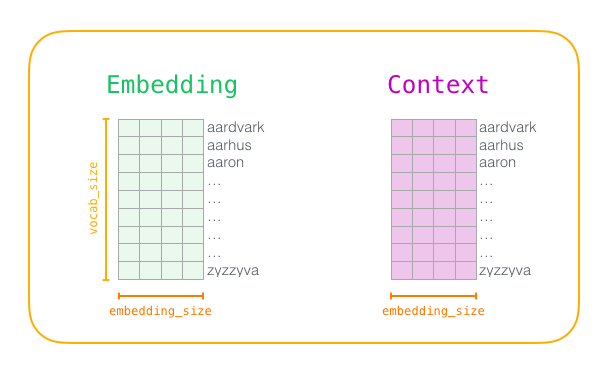
At the start of the training process, we initialize these matrices with random values. Then we start the training process. In each training step, we take one positive example and its associated negative examples. Let’s take our first group:
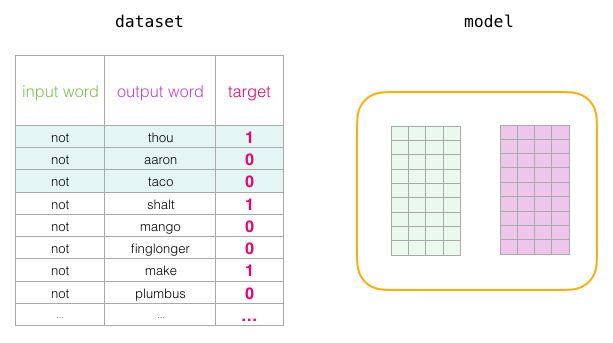
Now we have four words: the input word not and output/context words: thou (the actual neighbor), aaron, and taco (the negative examples). We proceed to look up their embeddings – for the input word, we look in the Embedding matrix. For the context words, we look in the Context matrix (even though both matrices have an embedding for every word in our vocabulary).
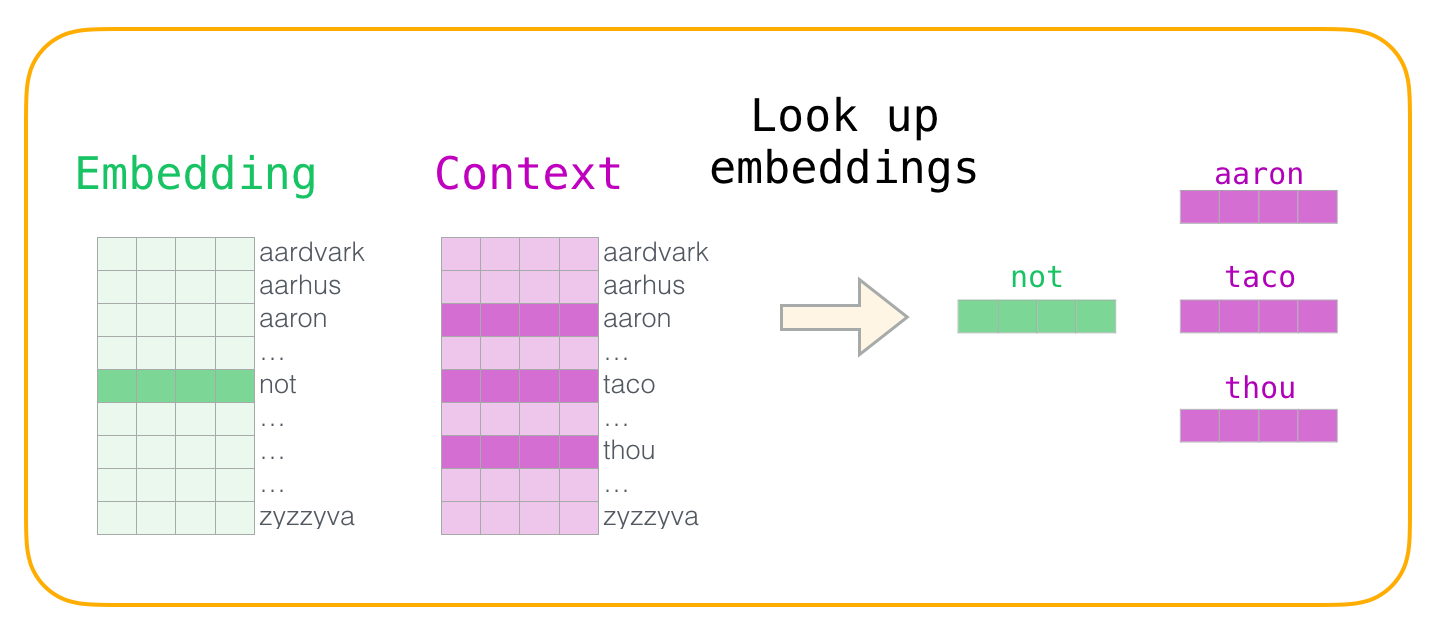
Then, we take the dot product of the input embedding with each of the context embeddings. In each case, that would result in a number, that number indicates the similarity of the input and context embeddings
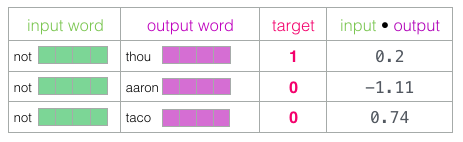
Now we need a way to turn these scores into something that looks like probabilities – we need them to all be positive and have values between zero and one. This is a great task for sigmoid, the logistic operation.
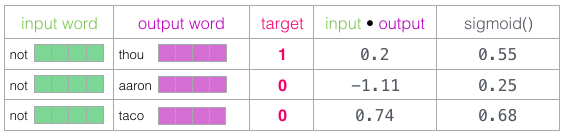
And we can now treat the output of the sigmoid operations as the model’s output for these examples. You can see that taco has the highest score and aaron still has the lowest score both before and after the sigmoid operations.
Now that the untrained model has made a prediction, and seeing as though we have an actual target label to compare against, let’s calculate how much error is in the model’s prediction. To do that, we just subtract the sigmoid scores from the target labels.
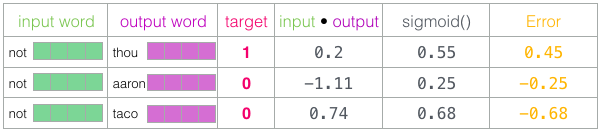
Here comes the “learning” part of “machine learning”. We can now use this error score to adjust the embeddings of not, thou, aaron, and taco so that the next time we make this calculation, the result would be closer to the target scores.
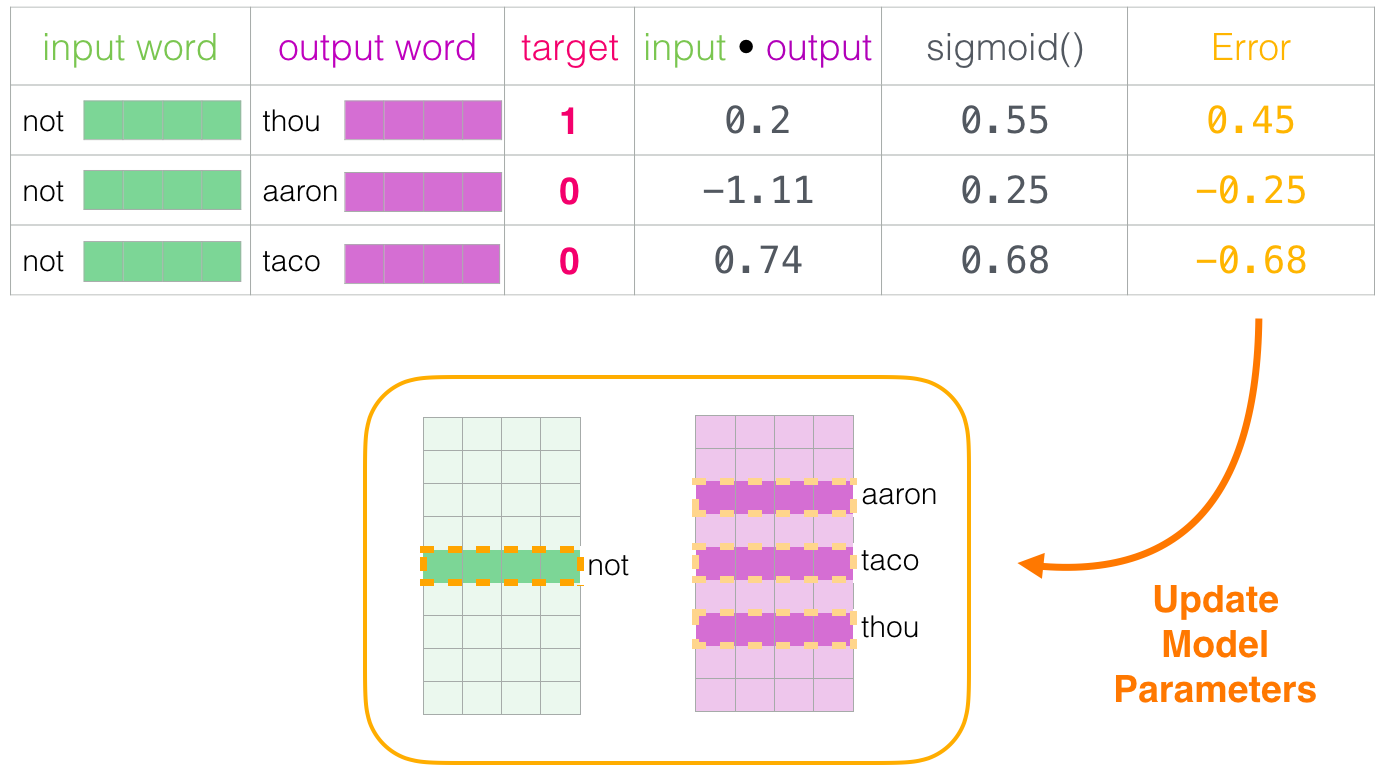
This concludes the training step. We emerge from it with slightly better embeddings for the words involved in this step (not, thou, aaron, and taco). We now proceed to our next step (the next positive sample and its associated negative samples) and do the same process again.
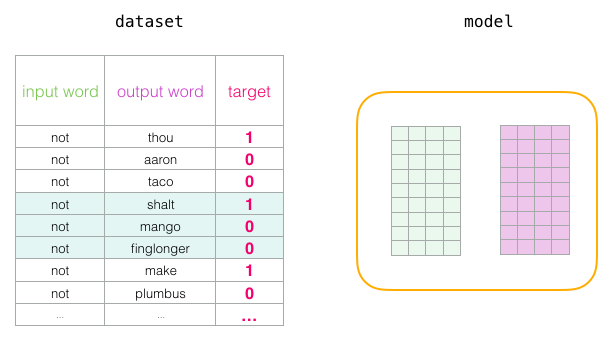
The embeddings continue to be improved while we cycle through our entire dataset for a number of times. We can then stop the training process, discard the Context matrix, and use the Embeddings matrix as our pre-trained embeddings for the next task.
Window Size and Number of Negative Samples
Two key hyperparameters in the word2vec training process are the window size and the number of negative samples.
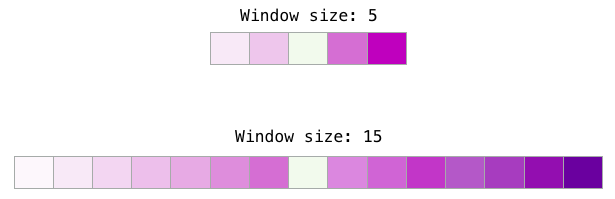
Different tasks are served better by different window sizes. One heuristic is that smaller window sizes (2-15) lead to embeddings where high similarity scores between two embeddings indicates that the words are interchangeable (notice that antonyms are often interchangable if we’re only looking at their surrounding words – e.g. good and bad often appear in similar contexts). Larger window sizes (15-50, or even more) lead to embeddings where similarity is more indicative of relatedness of the words. In practice, you’ll often have to provide annotations that guide the embedding process leading to a useful similarity sense for your task. The Gensim default window size is 5 (five words before and five words after the input word, in addition to the input word itself).
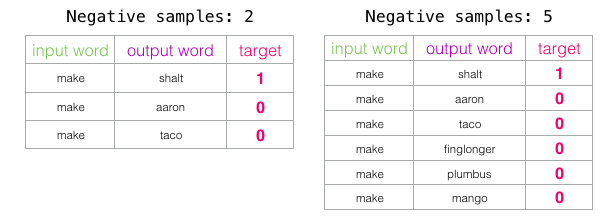
The number of negative samples is another factor of the training process. The original paper prescribes 5-20 as being a good number of negative samples. It also states that 2-5 seems to be enough when you have a large enough dataset. The Gensim default is 5 negative samples.
1. Download + load text8
The text8 dataset is a collection of cleaned English Wikipedia text prepared by Matt Mahoney, consisting of 100 million characters (100 MB) derived from a March 2006 Wikipedia snapshot.
Its preprocessing removes markup and punctuation, converts text to lowercase, and spells out numerical digits, leaving only the letters a–z and spaces.
Originally created for text compression experiments, its simple format also makes it useful for teaching word embedding models such as Word2Vec.
It contains text rather than manually assigned labels: training examples are constructed from the sequence of words, for example by pairing a word with nearby context words.
This makes text8 a concrete example of how the data itself can supply a prediction task through which a neural network learns useful representations.
Its simplified format, however, omits capitalization and punctuation that can convey meaning in natural language. Dataset description
Fetch the compressed text8.zip from Matt Mahoney’s site if not already present.
Extracts the raw text and tokenizes it by splitting on whitespace, producing ~17 million words.
DATA_DIR = "data"
TEXT8_URL = "http://mattmahoney.net/dc/text8.zip"
TEXT8_ZIP = os.path.join(DATA_DIR, "text8.zip")
TEXT8_TXT = os.path.join(DATA_DIR, "text8")

def download_text8():
    os.makedirs(DATA_DIR, exist_ok=True)
    if not os.path.exists(TEXT8_TXT):
        if not os.path.exists(TEXT8_ZIP):
            print("Downloading text8...")
            urllib.request.urlretrieve(TEXT8_URL, TEXT8_ZIP)
        print("Extracting text8...")
        with zipfile.ZipFile(TEXT8_ZIP) as z:
            z.extractall(DATA_DIR)
    with open(TEXT8_TXT, "r", encoding="utf-8") as f:
        text = f.read()
    return text

text = download_text8()
words = text.split()
print(f"Total words: {len(words):,}")
Total words: 17,005,2072. Vocabulary (TODO)
From our previous conversations, you already know that neural networks only understand numbers, specifically, tensors of numbers.
A word like "king" has to become an integer ID (say, 42) before any of the math in later sections can touch it. Here we build a consistent, reusable mapping between words and integers.
Counts word occurrences using Counter and discards any word appearing fewer than 5 times. Why drop words that appear fewer than 5 times (MIN_COUNT)? Very rare words (misspellings, foreign words, one-off names) provide almost no training signal i.e. the model would see each of them so few times that it could never learn a reliable vector for them, but they’d still bloat the vocabulary size and slow everything down. Dropping them is a standard, practical trade-off: we lose the ability to embed rare words, in exchange for a cleaner, faster-to-train model. (min_count=5 is the default used in the original Word2Vec paper.)
Sort the remaining tokens by descending frequency and construct two mappings:
word2idxmapping words to integer IDsidx2wordmapping integer IDs to words
If "king" is the 42nd most common word after filtering, then: - word2idx["king"] == 42 — used whenever we need to turn a word into a number the model can use. - idx2word[42] == "king" — used whenever we need to turn the model’s output back into a readable word.
Create a raw frequency array (freqs) for the remaining 71,290 unique tokens.
Why sort by frequency, descending? This is mostly a convention — putting the most common word at index 0 makes the vocabulary easier to inspect (the first few entries of idx2word are always things like “the”, “of”, “and”) and is required by some optimizations (like Huffman-coded softmax) that this particular notebook doesn’t use, but that you’ll see in other Word2Vec implementations.
At the end of this cell, vocab_size should be roughly 71,000 — down from the ~17 million raw occurrences, because most of those 17 million tokens are repeats of a much smaller set of ~71,000 unique words that occur at least 5 times.
from collections import Counter

MIN_COUNT = 5          # drop words rarer than this

def build_vocab(words, min_count=MIN_COUNT):
    raise NotImplementedError()
    return word2idx, idx2word, freqs

word2idx, idx2word, freqs = build_vocab(words)
vocab_size = len(word2idx)
print(f"Vocab size (min_count={MIN_COUNT}): {vocab_size:,}")
Vocab size (min_count=5): 71,2903. Subsampling
In addition to dropping very rare words, we also need to drop words that occur too frequently. In natural text, a small number of words (“the”, “of”, “and”, “to”…) make up a huge fraction of all word occurrences. These words appear next to almost every other word in the vocabulary, so they don’t tell the model much about which words are semantically related — “the” appearing near “dog” and “the” appearing near “astronomy” isn’t useful evidence that dog and astronomy are related. Worse, because “the” is so frequent, it would dominate training time if we treated every occurrence equally.
The fix: probabilistic downsampling.** For each occurrence of a word in the corpus (not each unique word — each time it shows up), we flip a biased coin and decide whether to keep it, using the Mikolov subsampling heuristic:
\[P(\text{keep}) = \min(1, \sqrt{t/f} + t/f)\]
where f is how frequent that word is (as a fraction of the whole corpus) and t = 10⁻⁵ is a fixed threshold.
- Take a very common word with
f = 0.05(5% of all tokens, roughly the frequency of “the” in English text). Thent/f = 0.0002, andP(keep) = √0.0002 + 0.0002 ≈ 0.0142 + 0.0002 ≈ 0.0144. Only about 1.4% of occurrences of “the” are kept — the vast majority are dropped. - Take a moderately rare word with
f = 0.00001(i.e.,f = t). Thent/f = 1, andP(keep) = √1 + 1 = 2, which themin(1, ...)clamps back down to1— meaning this word is always kept.
Drop stop words and ubiquitous tokens (like “the”, “of”) to balance word frequencies and accelerate training, reducing the token count from ~17M to ~5.56M
So subsampling isn’t the same as deleting stopwords outright: it’s a smooth dial that keeps rare and moderately-frequent words essentially untouched while aggressively thinning out only the handful of extremely common words. That’s why the token count drops from ~17M to ~5.56M — roughly a 3x reduction — even though the vocabulary itself (71,290 unique words) doesn’t shrink at all.
Why bother? Two payoffs: training is roughly 3x faster (fewer tokens to process), and the remaining training pairs are more informative on average, which tends to produce better embeddings, not just faster ones.
SUBSAMPLE_T = 1e-5      # word2vec subsampling threshold

def subsample(word_ids, freqs, t=SUBSAMPLE_T):
    """Randomly drop frequent words per the word2vec subsampling formula."""
    total = freqs.sum()
    word_freqs = freqs / total
    # probability of *keeping* each word
    keep_prob = np.minimum(1.0, np.sqrt(t / (word_freqs + 1e-12)) + t / (word_freqs + 1e-12))
    keep_prob_per_word = keep_prob[np.array(word_ids)]
    rand = np.random.rand(len(word_ids))
    kept = [wid for wid, kp, r in zip(word_ids, keep_prob_per_word, rand) if r < kp]
    return kept

word_ids = [word2idx[w] for w in words if w in word2idx]
word_ids = subsample(word_ids, freqs)
print(f"Words after subsampling: {len(word_ids):,}")
Words after subsampling: 5,567,1764. Negative Sampling Table
The “natural” way to train skip-gram would be: given a center word, predict the exact probability of every one of the ~71,000 vocabulary words being the nearby context word (a full softmax). That means computing 71,000 scores and normalizing them, for every single training pair, of which there are ~33 million. That’s far too slow to be practical.
Instead of “which of 71,000 words is the context word?”, we ask a much cheaper yes/no question, over and over: “is this specific (center, context) pair a real pair that occurred in the text, or is it random noise?” For every real (positive) pair, we manufacture a handful of fake (negative) pairs by pairing the same center word with random words from the vocabulary — words that (almost certainly) did not actually appear nearby. Training then becomes ordinary binary classification: push the model to output “yes” for real pairs and “no” for random ones. This is dramatically cheaper — a handful of comparisons instead of 71,000.
If we picked negative words with plain frequency-proportional probability, extremely common words (“the”, “of”) would be picked as negatives constantly, while rare words would almost never be used as negatives and the model would get very little signal about them. The original Word2Vec paper found that raising each word’s frequency to the 0.75 power before sampling works better in practice: it’s a smoothing exponent that boosts the relative sampling rate of rarer words while still sampling common words more often than rare ones overall (just less disproportionately than raw frequency would). Concretely, f^0.75 shrinks the gap between a common word’s frequency and a rare word’s frequency, without reversing their order.
Compute the unigram distribution raised to the \(0.75\) power (\(f(w)^{0.75}\)) to increase the draw rate of rare words relative to very frequent ones.
Build a discrete lookup table (neg_table) of 10 million pre-allocated word indices for \(O(1)\) negative sampling during training.
Drawing from a probability distribution over 71,000 items (e.g., with np.random.choice(vocab, p=probs)) is relatively slow because of the internal computation needed to sample from the distribution correctly, and we need to do it millions of times. Instead, this code builds one big array (neg_table, 10 million entries) once, where each word index appears a number of times proportional to its f^0.75 weight. After that, sampling a negative word is just “generate a random array index and look it up” — an O(1) lookup instead of a distribution draw, which matters a lot when you’re doing it hundreds of millions of times over the course of training.
def build_negative_sampling_table(freqs, table_size=10_000_000, power=0.75):
    """Unigram^0.75 distribution, as in the original word2vec paper."""
    probs  = freqs ** power
    probs /= probs.sum()
    counts = np.round(probs * table_size).astype(np.int64)
    table  = np.repeat(np.arange(len(freqs)), counts)
    np.random.shuffle(table)
    return table

neg_table = build_negative_sampling_table(freqs)
5. SkipGramDataset (TODO)
Each training example is a triple: (center_word, context_word, [negative_word_1, ..., negative_word_K]). The center and context word come from actual nearby positions in the (subsampled) text; the negative words are random draws from the table built in Section 4.
For a sentence like ... machine learning models learn patterns from data ..., if learning is the center word and the window radius happens to be 2, the context words are the up-to-4 words within 2 positions on either side: machine, models, learn, patterns. Every (center, context) combination within that window becomes one positive training pair — so learning alone generates up to 4 pairs from this one position in the text.
Iterate through the subsampled text using a dynamic context window radius (randint(1, window_size)). The dynamic window reweights the training data so that closer context words are seen more often, on average, than words at the edge of the maximum window. A word 1 position away is inside the window on every draw (radius 1 through 5); a word 5 positions away is only inside the window when the random radius happens to land on exactly 5. This matches the intuition that closer words tend to be more semantically related to the center word than distant ones, without hard-coding a specific decay function.
Pre-generate all positive (center, context) pairs (~33.4 million pairs). self.pairs ends up holding about 33.4 million (center, context) tuples — this is why the dataset is built once and reused, rather than recomputed for every epoch.
On item access (__getitem__), draws NEG_SAMPLES negative word IDs at random from neg_table for each positive pair.
Why generate negatives on-the-fly in __getitem__ instead of precomputing them alongside the positive pairs? Two reasons: (1) memory — storing negatives for all ~33 million positive pairs up front would use far more RAM than storing them just-in-time when a batch is requested, and (2) variety — generating fresh random negatives every time an example is fetched means the model sees different negative examples on each pass through the data (each epoch), which is a mild but free form of data augmentation.
NEG_SAMPLES = 10        # negative samples per positive pair
WINDOW_SIZE = 5         # max context window radius

class SkipGramDataset(Dataset):
    """Generates (center, context, negatives) triples on the fly per index."""

    def __init__(self, word_ids, neg_table, window_size=WINDOW_SIZE, neg_samples=NEG_SAMPLES):
        self.word_ids    = word_ids
        self.neg_table   = neg_table
        self.window_size = window_size
        self.neg_samples = neg_samples
        # precompute all (center, context) index pairs
        self.pairs = []
        n = len(word_ids)
        raise NotImplementedError()

    def __len__(self):
        return len(self.pairs)

    def __getitem__(self, idx):
        raise NotImplementedError()
        return center, context, negatives

dataset = SkipGramDataset(word_ids, neg_table)
6. DataLoader
** GPUs are fast because they do many identical arithmetic operations in parallel. Feeding the model one training example at a time wastes almost all of that parallelism — instead, we group BATCH_SIZE = 2048 examples together and process them as a single unit, so 2048 forward and backward passes happen essentially simultaneously.
Defines collate_fn to convert batches of (center, context, negatives) into PyTorch LongTensors with shapes (B,), (B,), and (B, K).
DataLoader pulls 2048 individual (center, context, negatives) tuples from the dataset (via __getitem__, which you just read in Section 5). Those arrive as a plain Python list of tuples — not yet something PyTorch can do matrix math on. collate_fn’s job is to take that list and stack it into three PyTorch tensors: - centers: shape (2048,) — one center-word ID per example - contexts: shape (2048,) — one true context-word ID per example - negatives: shape (2048, 10) — 10 negative-word IDs per example (since NEG_SAMPLES = 10)
Why num_workers=2? Reading and assembling 2048 examples (each of which does a random table lookup for negatives) takes real CPU time. With num_workers=2, two background processes prepare the next batch while the GPU is still busy training on the current one, so the GPU is rarely left waiting on data.
Why drop_last=True? If the total number of training pairs isn’t a perfect multiple of 2048, the very last batch would be smaller than the rest. Dropping it keeps every batch a uniform, predictable size — simpler code, and a negligible loss of data out of 33 million pairs.
Instantiates a parallelized PyTorch DataLoader with batch_size=2048, worker threads, and batch shuffling.
BATCH_SIZE = 2048

def collate_fn(batch):
    centers   = torch.LongTensor([b[0] for b in batch])
    contexts  = torch.LongTensor([b[1] for b in batch])
    negatives = torch.LongTensor(np.stack([b[2] for b in batch]))
    return centers, contexts, negatives

print(f"Training pairs: {len(dataset):,}")
loader = DataLoader(dataset, batch_size=BATCH_SIZE, shuffle=True,
                      collate_fn=collate_fn, num_workers=2, drop_last=True)
Training pairs: 33,403,8657. Model
(SkipGramNegSampling)
Implement two separate embedding matrices: in_embed (center words) and out_embed (context/negative words).
You might expect a single table of word vectors, but this model keeps two: in_embed (used when a word plays the center role) and out_embed (used when a word plays the context or negative role). Why not share one table for both roles?
If a word’s center-vector and context-vector were forced to be identical, the dot product of a word with itself (v_c · v_c) would always be large and positive, which would push the training objective to trivially maximize every word’s similarity to itself rather than learning meaningful relationships between different words. Keeping the roles separate avoids this degenerate shortcut. (Only in_embed is kept at the end — see Section 9 — because it’s the one that ends up being used as the word embedding downstream.)
Calculates the negative sampling objective:
\[\mathbf{L} = -\sum \left[\log \sigma(v_c^\top v_o) + \sum_{k=1}^K \log \sigma(-v_c^\top v_{n_k})\right]\]
Walking through forward() line by line: - v_c = self.in_embed(centers) — look up the center-role vector for each word in the batch. Shape: (B, D) where B is batch size and D = 200. - v_o = self.out_embed(contexts) — look up the context-role vector for the true nearby word. Shape: (B, D). - v_neg = self.out_embed(negatives) — look up context-role vectors for all the random “wrong answer” words. Shape: (B, K, D) where K = 10.
The dot product v_c · v_o is large when the two vectors point in similar directions (i.e., the model currently thinks these words are related), and close to zero or negative when they don’t. Passing that score through the sigmoid function squashes it into a (0, 1) range that behaves like a probability. F.logsigmoid(pos_score) computes log(sigmoid(pos_score)) directly (more numerically stable than computing sigmoid then taking log separately) — this term is large (closer to 0, since log of something ≤ 1 is negative) exactly when the model is confident the pair is real.
Uses dot products and batch matrix multiplication (torch.bmm) to score positive and negative samples efficiently.
torch.bmm(v_neg, v_c.unsqueeze(2)) computes the dot product between the center vector and each of the 10 negative vectors in one batched matrix multiply (bmm = “batch matrix multiply” — it’s doing 10 dot products per example, for all 2048 examples, in a single fast operation). F.logsigmoid(-neg_score) flips the sign before the sigmoid — this rewards the model for making negative pairs’ scores low (unlike positive pairs, where we wanted the score high).
The math given above, \[\mathbf{L} = -\sum \left[\log \sigma(v_c^\top v_o) + \sum_{k=1}^K \log \sigma(-v_c^\top v_{n_k})\right]\] says: for each training example, add up (a) how confidently the model identifies the real pair as real, and (b) how confidently it identifies each of the 10 fake pairs as fake, then negate the sum. Because we minimize loss during training, and this expression is negative log-probability, minimizing it is the same as maximizing the model’s confidence in the correct answers — this is exactly the same idea as Part A/B of the “minimizing log-likelihood” worked example, just applied to a much larger, two-parameter-table model.
in_embed is initialized with small random values in a narrow range — this gives every word a distinct, if initially meaningless, starting vector to learn from. out_embed is initialized to all zeros. This is a common, deliberate choice in Word2Vec implementations: since out_embed starts at zero, the first gradient step is driven entirely by in_embed’s (random but distinct) values, which tends to produce more stable early training than starting both tables randomly.
EMBED_DIM = 200         # embedding dimensionality


class SkipGramNegSampling(nn.Module):
    """Two embedding tables: 'in' (center word) and 'out' (context word)."""

    def __init__(self, vocab_size, embed_dim):
        super().__init__()
        self.in_embed = nn.Embedding(vocab_size, embed_dim)
        self.out_embed = nn.Embedding(vocab_size, embed_dim)
        init_range = 0.5 / embed_dim
        nn.init.uniform_(self.in_embed.weight, -init_range, init_range)
        nn.init.constant_(self.out_embed.weight, 0.0)

    def forward(self, centers, contexts, negatives):
        v_c       = self.in_embed(centers)                       # (B, D)
        v_o       = self.out_embed(contexts)                      # (B, D)
        v_neg     = self.out_embed(negatives)                   # (B, K, D)

        pos_score = torch.sum(v_c * v_o, dim=1)              # (B,)
        pos_loss  = F.logsigmoid(pos_score)

        neg_score = torch.bmm(v_neg, v_c.unsqueeze(2)).squeeze(2)  # (B, K)
        neg_loss  = F.logsigmoid(-neg_score).sum(dim=1)

        loss      = -(pos_loss + neg_loss).mean()
        return loss

model = SkipGramNegSampling(vocab_size, EMBED_DIM).to(DEVICE)
8. Training (TODO)
Run Adam optimization over 5 epochs across the ~33.4M training pairs. Adam is an optimization algorithm — a smarter version of “move each parameter a little in the direction that reduces the loss” (plain gradient descent). It keeps a running estimate of each parameter’s typical gradient size and adjusts its step size accordingly, which generally makes training faster and more stable than using a single fixed learning rate for every parameter. You don’t need to implement Adam yourself here — torch.optim.Adam handles it — but it’s worth knowing the name, since you’ll see it in almost every deep learning codebase.
Track and print running batch loss every 2,000 steps as the model converges (currently running on an A100 GPU).
What is expected inside one loop iteration, in plain language: 1. optimizer.zero_grad() — clear out gradients left over from the previous batch (PyTorch accumulates gradients by default, so this reset is required every step). 2. loss = model(centers, contexts, negatives) — the forward pass from Section 7: look up embeddings, compute the negative-sampling loss for this batch of 2048 examples. 3. loss.backward() — backpropagation. PyTorch automatically computes how much each entry in in_embed and out_embed contributed to the loss, for every one of the 2048 examples in the batch. 4. optimizer.step() — the Adam optimizer nudges every embedding value slightly, in the direction that would have reduced this batch’s loss.
Epoch vs. batch vs. step — these are easy to conflate. One step is one pass through the four lines above, using one batch of 2048 examples. One epoch is enough steps to cover all ~33 million training pairs once — roughly 16,300 steps per epoch here. EPOCHS = 5 means the model sees the entire (subsampled) corpus five times over.
The average loss should generally trend downward across batches within an epoch, though it will be noisy from batch to batch (each batch is a small, random sample of the data). If it’s flat or increasing from the start, something upstream is likely misconfigured (e.g., a learning rate that’s too high).
A practical note on compute. This is by far the most time-consuming cell in the notebook — training on ~33 million pairs for 5 epochs is realistically a GPU job (the comment mentions an A100). If you’re following along without a GPU, expect this cell to take substantially longer, or consider reducing EPOCHS or using a smaller slice of word_ids just to see the mechanics work end-to-end.
EPOCHS = 5
LR = 0.003

optimizer = torch.optim.Adam(model.parameters(), lr=LR)

raise NotImplementedError()
epoch 1 | batch 2000 | avg loss 3.4092
epoch 1 | batch 4000 | avg loss 3.1764
epoch 1 | batch 6000 | avg loss 3.0666
epoch 1 | batch 8000 | avg loss 3.0009
epoch 1 | batch 10000 | avg loss 2.9566
epoch 1 | batch 12000 | avg loss 2.9247
epoch 1 | batch 14000 | avg loss 2.9006
epoch 1 | batch 16000 | avg loss 2.8815
Epoch 1/5 done | avg loss 2.8789
epoch 2 | batch 2000 | avg loss 2.5741
epoch 2 | batch 4000 | avg loss 2.5936
epoch 2 | batch 6000 | avg loss 2.6073
epoch 2 | batch 8000 | avg loss 2.6177
epoch 2 | batch 10000 | avg loss 2.6259
epoch 2 | batch 12000 | avg loss 2.6325
epoch 2 | batch 14000 | avg loss 2.6383
epoch 2 | batch 16000 | avg loss 2.6430
Epoch 2/5 done | avg loss 2.6437
epoch 3 | batch 2000 | avg loss 2.4800
epoch 3 | batch 4000 | avg loss 2.5061
epoch 3 | batch 6000 | avg loss 2.5257
epoch 3 | batch 8000 | avg loss 2.5404
epoch 3 | batch 10000 | avg loss 2.5527
epoch 3 | batch 12000 | avg loss 2.56269. Save Model
Extracts the learned input embeddings (model.in_embed.weight) onto CPU memory.
Saves the embedding tensor along with vocabulary dictionaries (word2idx, idx2word) into a .pt checkpoint for downstream use.
Why save only in_embed, and not out_embed too? Recall from Section 7 that in_embed holds each word’s vector in its center-word role, and out_embed holds each word’s vector in its context/negative-word role. out_embed was only ever needed as scaffolding to make training work — once training is done, the vectors people actually use for downstream tasks (finding similar words, analogies, feeding into another model) are the in_embed vectors. This is standard practice across Word2Vec implementations, not specific to this notebook.
Why save word2idx and idx2word alongside the raw tensor? The embedding tensor by itself is just a (71290, 200) grid of numbers — row 42 is meaningless without knowing that row 42 corresponds to "king". Bundling the vocabulary mappings with the embeddings means anyone loading this file later (including you, in Section 10, and potentially in an entirely different notebook) can go from word → vector and vector → word without having to rebuild the vocabulary from the original text.
Connecting back to the intro. This save step is exactly what makes an embedding “pretrained” in the sense discussed at the very start of this notebook: the .pt file produced here can now be loaded and reused by a completely different downstream model or task, without ever re-running the expensive training loop in Section 8.
torch.save({
    "in_embed": model.in_embed.weight.data.cpu(),
    "word2idx": word2idx,
    "idx2word": idx2word,
}, "text8_skipgram_embeddings.pt")
print("Saved embeddings to text8_skipgram_embeddings.pt")
10. Analogy evaluation
king - man + woman ~= queen
Normalizes the learned vectors to unit length to compute cosine similarities via matrix multiplication.Evaluates semantic vector arithmetic (\(a - b + c \approx d\)) on classic benchmarks (e.g., \(\text{king} - \text{man} + \text{woman} \approx \text{queen}\) and \(\text{paris} - \text{france} + \text{germany} \approx \text{berlin}\)).
Why normalize vectors before comparing them (F.normalize)? Two vectors can point in almost the same direction but have very different lengths (one word might just have a “louder” vector than another simply from how often it appeared in training). Cosine similarity is designed to compare direction only, ignoring length — and normalizing every vector to length 1 before taking dot products is exactly what turns a plain dot product into a cosine similarity. After normalization, embed @ vec (a matrix-vector product) computes the cosine similarity between vec and every word in the vocabulary in one fast operation.
The analogy arithmetic, spelled out. king - man + woman is computed directly on the embedding vectors: take king’s vector, subtract man’s vector, add woman’s vector. The intuition (not a mathematical guarantee, but what tends to emerge from training) is that king - man captures something like “a direction associated with royalty, independent of gender,” and adding woman’s vector moves back into “person” space along that same direction — landing near queen. This is the same phenomenon discussed in the notebook’s introduction: individual dimensions aren’t meaningfully labeled, but directions and offsets between vectors can still capture real relationships.
Why exclude {a, b, c} from the results? Without this, the single closest vector to king - man + woman is very often just king itself (or another word in the query) rather than an interesting analogy answer — the model has no reason to rank the input words low just because they were used in the arithmetic. Explicitly excluding them forces the function to report the best new word instead.
Reading the output. topn=5 results are printed as (word, cosine similarity) pairs, ranked highest similarity first. A similarity close to 1 means “points in almost the same direction”; a similarity near 0 means “essentially unrelated directions.” Don’t expect the top-1 result to always be the “textbook” answer (e.g., queen) — the quality of analogies depends heavily on how much training data was seen and how many epochs were run. If your model was only lightly trained, treat this as a sanity check (“are the top few results at least plausible?”) rather than a strict pass/fail test.
Something to try: run a few analogies of your own choosing (they must use words that survived the min_count=5 filter from Section 2) and discuss in class which ones work well and which ones don’t — and why that might be, given what kind of text (Wikipedia) the model was trained on.
def analogy(model, word2idx, idx2word, a, b, c, topn=5):
    """Solve a - b + c ~= ? e.g. king - man + woman ~= queen"""
    embed = model.in_embed.weight.data
    embed = F.normalize(embed, dim=1)  # cosine similarity via normalized dot product

    for w in (a, b, c):
        if w not in word2idx:
            print(f"'{w}' not in vocabulary.")
            return

    vec = embed[word2idx[a]] - embed[word2idx[b]] + embed[word2idx[c]]
    vec = F.normalize(vec, dim=0)

    sims = embed @ vec  # cosine similarity to every word in vocab
    exclude = {word2idx[a], word2idx[b], word2idx[c]}
    ranked = torch.argsort(sims, descending=True)

    results = []
    for idx in ranked.tolist():
        if idx in exclude:
            continue
        results.append((idx2word[idx], sims[idx].item()))
        if len(results) == topn:
            break

    print(f"{a} - {b} + {c} ~= ?")
    for w, score in results:
        print(f"  {w:<15} {score:.4f}")
    return results


# the classic test
analogy(model, word2idx, idx2word, "paris", "france", "germany", topn=5)
analogy(model, word2idx, idx2word, "soccer", "ball", "puck", topn=5);
analogy(model, word2idx, idx2word, "king", "man", "woman", topn=5)